Showing posts with label Gcash. Show all posts

Commuters on Metro Manila's busiest railway can now experience a faster, more convenient way to travel. The Department of Transportation (DOTr) today officially launched cashless payment options for the MRT-3, marking a significant upgrade in the urban transit system and positioning it as a pioneer in seamless payment technology.


DOTr Secretary Vince Dizon led the unveiling at the MRT-3 Ayala Station, personally demonstrating the ease of the new system. He highlighted that commuters can now simply tap their debit or credit cards directly at the gates or, for e-wallet users, generate a QR code from their mobile apps for scanning.


"There is no additional fare here," Secretary Dizon assured commuters. "The system is, whatever is deducted from your GCash, your credit card, your debit card, it is the same as if you bought a single journey ticket."


Loading...

This innovative payment setup is touted by the transport chief as the first of its kind globally, capable of accepting both Near Field Communication (NFC) taps and QR codes from a single terminal. The DOTr also announced plans to extend these same cashless options to LRT-1 and LRT-2 lines in the near future, with the support of GCash and RCBC.


How to Use GCash at MRT-3 Gates

For the millions of Filipinos who rely on e-wallets, paying for their MRT-3 ride using the GCash app is now remarkably straightforward:

STEP 1 - Open your GCash app: Ensure you have the latest version installed on your smartphone.


STEP 2 - Look for "Commute" and tap it: This dedicated icon simplifies access to the QR ticketing feature.

STEP 3 - A QR Code will appear: This unique code is your digital ticket.

STEP 4 - Tap or scan your QR Code at an MRT-3 entry gate: Simply present your phone screen with the QR code to the designated scanner.


STEP 5 - The gate will open: Proceed through the turnstile.

STEP 6 - Do the same at the exit gate: The process is identical for exiting the station, ensuring your fare is correctly calculated.


Important Note: Your GCash account must have a minimum balance of ₱28 to successfully use the Commute QR code feature. For added convenience, users can also download a copy of their Commute QR for subsequent gate uses.


Wide Range of Participating Banks

Beyond GCash, the DOTr confirmed a broad list of banks supporting the MRT-3's new cashless payment method, offering flexibility for cardholders:


  • GCash: Visa (Debit), QR Code
  • Landbank: Mastercard (Debit/Credit), Visa (Debit)
  • BPI: Visa (Debit/Credit)
  • BDO: Mastercard (Credit), Visa (Debit/Credit)
  • HSBC: Visa (Debit)
  • GOTyme: Visa (Debit)
  • Union Bank: Visa (Debit)
  • RCBC: Mastercard (Debit/Credit), Visa (Debit)
  • Metrobank: Mastercard (Credit)
  • Security Bank: Mastercard (Credit)
  • Maya: Visa (Debit/Credit)
  • Chinabank: Mastercard (Credit)


This expansion of payment options is expected to significantly reduce queuing times, improve efficiency, and enhance the overall commuting experience for MRT-3 passengers, ushering in a new era of modern urban transportation in the Philippines.

You Can Now Pay For Your MRT-3 Ride Using Your GCash App!


In today's fast-paced world, financial needs can arise unexpectedly. Whether it's for emergencies, investments, or personal projects, having access to quick cash can make a significant difference.


With GLoan, offered by GCash, you can conveniently secure a loan to address your urgent financial requirements. This comprehensive guide will walk you through the process, ensuring you make the most of this efficient and hassle-free service.

Loading...

What is GLoan?

GLoan is a digital lending service provided by GCash, one of the Philippines' leading mobile wallet platforms. It offers users the opportunity to apply for personal loans directly through the GCash app. GLoan aims to simplify the borrowing process, making it accessible to anyone with a verified GCash account.


Key Features of GLoan


Accessibility: GLoan is available directly through the GCash app, making it convenient for users to apply for a loan anytime, anywhere.

No Collateral Required: Unlike traditional loans, GLoan does not require collateral. This means you can access funds without risking your assets.

Quick Approval: The application process is streamlined, ensuring swift approval and disbursement of funds to your GCash account.

Competitive Interest Rates: GLoan offers competitive interest rates, ensuring that you can manage your loan responsibly.

Flexible Repayment Options: Enjoy flexible repayment terms that suit your financial situation, allowing you to repay the loan without straining your budget.


How to Qualify for GLoan


1. GCash Account Verification
  • Ensure your GCash account is verified. If not, complete the verification process by submitting the necessary documents.

2. Open the GCash App
  • Launch the GCash app on your mobile device. If you don’t have the app, download it from the App Store or Google Play Store and register for an account.

3. Navigate to GLoan
  • Inside the GCash app, find the GLoan feature. It's typically located in the 'Borrow Money' or 'Financial Services' section.

4. Submit Required Information
  • Fill out the application form with accurate details, including your personal information, employment details, and the loan amount you wish to borrow.

5. Document Submission
  • If required, upload necessary documents, such as your valid ID and proof of income, directly through the app.

6. Wait for Approval
  • After submitting your application, wait for GLoan to process your request. Approval times can vary, but you can typically expect a quick response.

7. Receive Funds
  • Upon approval, the loan amount will be disbursed directly to your GCash account. You can then use the funds for your intended purpose.


Repayment Process


Set Up Repayment Method: Upon loan approval, set up a repayment method within the GCash app. You can link your bank account or use your GCash balance to repay the loan.

Automatic Deductions: Opt for automatic deductions to ensure timely repayments. GCash will deduct the monthly installment amount from your chosen payment source on the specified due date.

Timely Repayments: Make sure to repay your loan installments on time to maintain a good credit standing and ensure access to future loan opportunities.


Tips for Responsible Borrowing


  • Borrow Wisely: Only borrow the amount you need and can afford to repay comfortably.

  • Understand Terms and Conditions: Familiarize yourself with the terms and conditions, including interest rates and repayment schedules, before accepting the loan.

  • Plan Repayments: Plan your budget to accommodate the loan repayments, ensuring you meet your financial obligations without stress.

  • Avoid Multiple Loans: Avoid taking multiple loans simultaneously to prevent overburdening yourself with debt.


ATTRACTIONS TO SEE IN MANILA 

Klook.com

With GLoan by GCash, you have a reliable financial partner at your fingertips. Whether you need emergency funds, want to invest in your business, or pursue personal goals, GLoan offers a seamless and accessible borrowing experience.

By understanding the application process, repayment procedures, and responsible borrowing practices, you can make the most of this digital lending service and achieve your financial objectives with confidence. Remember, responsible borrowing leads to financial empowerment and stability.

GLoan: GCash Quick Cash Solution


You wanted to maximize your GCash account by using GCredit/GGives/GLoan but do not have enough GScore standing? Here's a guide on how you can increase your GScore.


But First, What is GScore?

GScore is a score that reflects how active you are in using GCash’s products and features. Your GScore is unique to your mobile number and cannot be transferred. Your new SIM activities would be the basis for your current GScore.

Loading...

How GScore is computed?

It is the trust rating computed for you based on the various activities you do in GCash such as maintaining an active wallet balance, paying your bills, using GSave, GInvest, and GInsure. Metered scoring is not yet available as no score assures the unlocking of lending products. Our system regularly updates your GScore weekly based on your recent activities, which can be seen in the GCash app.

If you’ve availed of a product before such as GCredit, GGives, or GLoan, and it becomes unavailable, there may have been certain policies or scoring metrics that you did not meet to qualify for GCredit/GGives/GLoan. Each of the products has its own specific policies in place.


How Can I Increase My GScore?

Your GScore is not computed solely based on the frequency of your usage but considers various components to generate your user score. It is based on your frequent GCash activity, maintaining balance, loan performance (early/on-time payments), habitual payment of bills, regular savings and investments, and your purchase of insurance products.

Here are some tips to enhance your GScore:


Verify Your Account

Achieve full verification status by providing a valid ID (not expired) and a selfie. Fully verified users can access a wider range of services within the GCash app.


Regular Cash Ins

Maintain a healthy wallet balance by consistently cashing in to your GCash account. Explore the different methods available for cashing in to ensure your wallet is well-funded.


Utilize GCash for Transactions

Make use of GCash services like Pay Online and Pay Bills for your everyday transactions, ensuring your usage is diversified.


Frequent GInvest Investments

Grow your wealth by investing as low as PHP 50 in GInvest. Gain access to products from the country’s most trusted investment companies to enhance your financial portfolio.


Regular GSave Deposits

Plan for your future by saving with GSave. Watch your savings grow rapidly and enjoy a high-interest rate with any amount you deposit regularly.


Explore GInsure Products

Discover a variety of insurance options, including life, health, car, and more, through GInsure. Tailor your coverage to fit your specific needs from a range of partners.


Timely Repayment of GCredit, GLoan, and GGives

Ensure you pay your dues for GCredit, GLoan, and GGives on time or early. Failure to do so may affect your eligibility for future credit transactions until the total amount due is paid.


Maximize Your GCredit

Make the most of your GCredit by spending up to your allowed limit. Responsible use of your credit line can positively impact your GScore.


Active Participation in GCredit, GGives, and GLoan

Stay engaged with GCredit, GGives, and GLoan services to demonstrate your responsible financial behavior and improve your GScore over time.


ATTRACTIONS TO SEE IN MANILA 

Klook.com

By following these practices, you can optimize your GScore, ensuring you have access to a wide range of GCash services and opportunities.

How Can I Increase My GScore and How is it Computed?


Here's how to update your GCash mobile number.


You lost access to your mobile number or you missed to register your SIM card which was deactivated and you found out that it is linked to your GCash account, what you should do next? Here's your guide in updating mobile number for your GCash account.

RELATED: What Will Happen To Unregistered SIM Cards?

Loading...

WHERE TO BUY A SIM CARD IN THE PHILIPPINES

Here are the top mobile networks (where you can purchase and get a SIM card) in the Philippines:

Shopee is my go-to app for things I needed like the ones above. If you'd like discounts and vouchers, you may get the best offers here:

Can I change my mobile number linked to my Gcash Account?

You cannot change your mobile number because it also serves as your account number. However, you may create a new account with a new number & request transfer of funds & GCash Lending Services to your new account.


If your sim got lost/ stolen/ defective/ expired, we strongly recommend you to contact and request your network service provider to give you a new sim with the same number.

READ: How to Block Lost/Stolen Phone Using IMEI (Report to NTC)

Also, before requesting for transfer of funds, we would like to remind you that we have some features that we cannot transfer to your new account. Please check the list below:

  • Information from your previous account
  • Transaction History
  • GScore
  • GForest
  • Piggy Bank

Once you have decided to transfer your funds from your old account to your new account. Follow the steps below.


STEP 1. Create a new GCash account with a new number.

STEP 2. Fully Verify your new GCash account. If you need help verifying, visit How do I get Fully Verified?

Note: You must be fully verified before proceeding to the next steps


ATTRACTIONS TO SEE IN MANILA 

Klook.com

STEP 3. Once verified, Submit a new ticket to transfer of funds from your old to your new account

For ‘Concern category’ choose:
  • My GCash Account → I still have funds on my old lost sim, kindly transfer to my new number.
  • If your old number was not verified, you will be required to provide a notarized  affidavit for your defective/expired/lost SIM

You will receive a confirmation email regarding the status of your request within 48 hours


STEP 4. If you have GCredit/ GGives/ GLoan, Submit a new ticket to transfer GCash Lending Services

For ‘Concern category’ choose:
  • GCredit → I lost my old number and I want to replace it with my new KYC’d number
  • You will receive a confirmation email regarding the status of your request within 48 hour


ACTIVITIES AND TOURS IN MANILA


OTHER GCASH HELPFUL TIPS


How to Change Your Mobile Number on Your GCash (Update Account)

gcash customer service 24/7 gcash customer service chat gcash customer service landline gcash submit ticket gcash support email how to fix gcash submit ticket gcash hotline number 2022 gcash customer complaint

Here's how to reach GCash support.


Are you having problems with your GCash transfer, cash-in or withdrawal? Instead of ranting about it on social media, you may call the GCash hotline number to get much-needed support and assistance. While GCash is arguably the most popular mobile wallet app in the Philippines, it is not without its share of problems. Some GCash customers complain that their cash transactions take a long time to complete.

Good thing, there are several ways to contact GCash customer service through telephone, email and chat to help resolve any issues you are having.

RELATED: GCASH: How to Register, How to Verify, How to Cash-in

Loading...

For any GCash-related concern, you can reach GCash Support through any of the following support channels:


Follow these steps to reach GCash Support through the GCash App.

HELPFUL ITEMS YOU CAN USE TO SAVE MONEY!

Here's my list of useful items for you to save or earn money wisely:

Shopee is my go-to app for things I needed like the ones above. If you'd like discounts and vouchers, you may get the best offers here:

Use the GCash App

What better way to ask for support than within the GCash app itself? Just open the GCash app and tap the menu icon. Select Help on the sliding menu to access the Help Center.

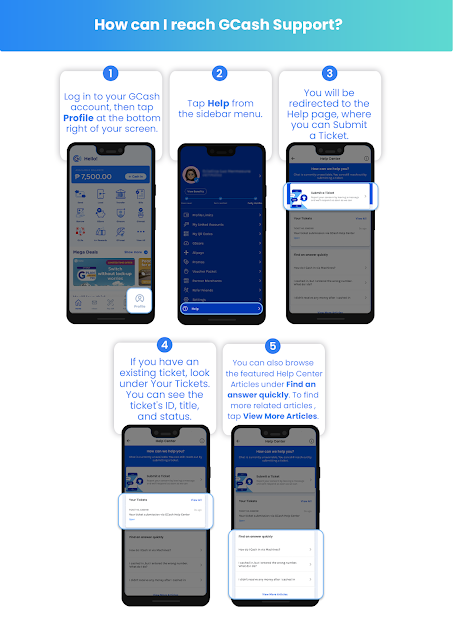
You have the option to chat with a GCash customer service agent or to submit a ticket. To submit a support ticket, tap Submit a Ticket and enter the required information. Here are the steps you can follow to submit a ticket on GCash app:

STEP 1: Log in to your GCash account, then tap Profile at the bottom right of your screen. 

STEP 2: Tap Help from the sidebar menu.

STEP 3: You will be redirected to the Help page, where you can Submit a Ticket.


STEP 4: If you have an existing ticket, look under Your Tickets. You can see the ticket's ID, title, and status.


STEP 5: You can also browse through the featured Help Center Articles under Find an answer quickly. To find more articles that are related to your concern, tap View More Articles to open the GCash Help Center.


You can check for updates on your support tickets on the Help Center page. You will also be informed via email when you get an update on your ticket.


Help in the GCash App

Here is a summary of how to reach GCash Support through the GCash App.


Call 2882

If your support request is urgent, you may call the GCash hotline number 2882 to speak to a customer service representative. The GCash hotline is available everyday from Monday to Sunday, 8:00 AM to 5:00 PM and is toll-free for Globe subscribers.

PLDT, Smart and other non-Globe subscribers may call (02) 7730-2882. Airtime and long-distance charges may apply.


Send an Email

Another way to contact GCash support is to send an email to support@gcash.com.


Send a Message on Twitter

If you have a Twitter account, you can tweet or send a direct message to the official GCash page on Twitter @gcashofficial. Include your ticket number if you have already submitted a support ticket.


GCash is a mobile wallet app that lets you instantly pay bills, buy load, send money, shop, and more – all in the safety of your own home!


Acknowledgement: This article is sponsored by Usapang Hanapbuhay.

Bisitahin ang Usapang Hanapbuhay Facebook Group para sa iba pang tips at mga diskarte sa pera!


Like Usapang Hanapbuhay Facebook page for other updates!
 gcash customer service 24/7 gcash customer service chat gcash customer service landline gcash submit ticket gcash support email how to fix gcash submit ticket gcash hotline number 2022 gcash customer complaint  gcash login gcash apk gcash online gcash register gcash install gcash international gcash account gcash app for pc

How to Contact GCash Hotline and Customer Service

how to check gcash wallet limit how to increase gcash limit to 1 million gcash limit per day gcash exceed monthly incoming limit gcash transaction limit exceeded transaction limit exceeded gcash fully verified how to increase gcash limit to 100k how to increase gcash limit without bank account

This is your comprehensive guide on how to increase your Gcash wallet limit.


You can increase your GCash wallet and transaction limits by the following:

Loading...

1. Verifying your GCash Account

Visit How do I get Fully Verified? to learn how to verify your GCash Account.

2. Linking and Cashing In

Link your account (and Cash-in) from any of the following banks to your GCash Account:
  • Bank of the Philippine Islands - How do I cash in using my BPI account?
  • UnionBank - How to Cash In via UnionBank 
  • Payoneer - How can I link my Payoneer to GCash?

RELATED: GCash List of Fees 


3. Opening a GSave Account and deposit at least ₱100 

Visit “What is GSave?” to learn more.


4. Opening a GInvest Account and invest at least ₱100 

Visit “What is GInvest?” to learn more.


HELPFUL ITEMS YOU CAN USE TO SAVE MONEY!

Here's my list of useful items for you to save or earn money wisely:

Shopee is my go-to app for things I needed like the ones above. If you'd like discounts and vouchers, you may get the best offers here:

Once you are able to perform any of the options provided, your Wallet Limit and Monthly Incoming Transaction Limit will increase to ₱500,000.


You will receive an SMS from GCash, and a Pop-Up notification in the GCash App regarding the successful upgrade within the next day.

Note: Only Philippine-issued SIM (eg. Globe, Smart, etc.) users are eligible to increase wallet limit.


Acknowledgement: This article is sponsored by Usapang Hanapbuhay.

Bisitahin ang Usapang Hanapbuhay Facebook Group para sa iba pang tips at mga diskarte sa pera!


Like Usapang Hanapbuhay Facebook page for other updates!
 how to check gcash wallet limit how to increase gcash limit to 1 million gcash limit per day gcash exceed monthly incoming limit gcash transaction limit exceeded transaction limit exceeded gcash fully verified how to increase gcash limit to 100k how to increase gcash limit without bank account

How to Increase GCash Wallet and Transaction Limits


This is your complete guide on how to pay your Telecom bill using Gcash.


Paying for your Telecom bill? You can now d it online with GCash, anytime, anywhere. With the Pay Bills feature, you can pay your Telecom bill either using your GCash fund or GCredit.

RELATED : List of GCash Over-the-Counter Cash-in Partners (and How to Cash-in)

Loading...

How to Pay Telecom Bill using GCash

Here are the steps on how to pay for your bill:

STEP 1: On the main dashboard, tap the Pay Bills icon to start the process.

STEP 2: Under Biller Categories, select Telecom.

STEP 3: From the list of partner billers, browse and choose the biller that you want to pay.

STEP 4: Next, enter the required details needed for the transaction. Click the NEXT button to continue.

STEP 5: Review your transaction, then click the CONFIRM button to process the payment.

STEP 6: Once the payment is successful, the payment reference number with the details of the transaction will be enumerated. Click the DONE button to go back to the main dashboard.


You will receive an SMS on your registered mobile number once the bill payment is successful. You will also receive the Payment Receipt in the email address you have provided while processing the payment.

Note: the payment will be posted based on the biller, but mostly, it will be posted the next business day. Some billers apply an additional transaction fee.

READ: GCash Guide On How To Cash-In With CLIQQ At 7-Eleven


HELPFUL ITEMS YOU CAN USE TO SAVE MONEY!

Here's my list of useful items for you to save or earn money wisely:

Shopee is my go-to app for things I needed like the ones above. If you'd like discounts and vouchers, you may get the best offers here:

List of Telecom Billers

Here is  the complete list of Telecom currently available in GCash, including, if the biller accepts GCredit payment, how long will the payment be posted, and if there is an additional fee applied. (You can use Find option or Alt+F on your keyboard to search for specific Telecom company)

Bayantel
Posted within 24 hours
No additional fee
✅ Accepts Gcredit

Bedoo
Posted next business day
No additional fee
✅ Accepts Gcredit

Bicol One Broadband Services, Inc.(BOBSI)
Posted next business day
PHP 12 additional fee
✅ Accepts Gcredit

CRUZTELCO
Posted next business day
PHP 10 additional fee
✅ Accepts Gcredit

Eastern Telecoms
Posted within 3 business days
No additional fee
✅ Accepts Gcredit

Globe AT HOME
Posted real time
No additional fee
✅ Accepts Gcredit

Globe Postpaid
Posted real time
No additional fee
✅ Accepts Gcredit


GTSI
Posted within 24 hours
PHP 10 additional fee
✅ Accepts Gcredit

Innove Communications
Posted within 3 business days
No additional fee
✅ Accepts Gcredit

PLDT
Posted within 24 hours
PHP 7 additional fee
✅ Accepts Gcredit

PT&T
Posted next business day
PHP 10 additional fee
✅ Accepts Gcredit

RACITELCOM
Posted next business day
PHP 12 additional fee
✅ Accepts Gcredit

RFi Network
Posted next business day
PHP 10 additional fee
✅ Accepts Gcredit

SITELCO
Posted within 24 hours
No additional fee
✅ Accepts Gcredit

Smart Communications
Posted real time
PHP 7 additional fee
✅ Accepts Gcredit

Wire Free Inc
Posted next business day
No additional fee
✅ Accepts Gcredit


NOTE: This list is as of July 2021, any changes to the terms and conditions may be applied by GCash without further notice.


Acknowledgement: This article is sponsored by Usapang Hanapbuhay.

Bisitahin ang Usapang Hanapbuhay Facebook Group para sa iba pang tips at mga diskarte sa pera!


Like Usapang Hanapbuhay Facebook page for other updates!

How to Pay Telecom Bill Using GCash (with List of Billers)

gcash cash-in fee in 7-11 gcash 7/11 cash in fee 2022 cliqq gcash cash in fee 7/11 cash out gcash how to cash in gcash in 7/11 without charge how to cash out gcash in 7-eleven without card how to cash in gcash in 7/11 2022 7/11 gcash cash in

Here's a guide on how to cash in at 7-Eleven via CLiQQ.


How can I cash in at 7-Eleven via CLiQQ?

You can cash in at any 7-Eleven store via the CLiQQ App or through CLiQQ Kiosks.

Loading...

Cash In via the CLiQQ App

  1. Log in to your CliQQ App, then tap Add e-money.
  2. Select GCash, then enter your GCash-registered number.
  3. Enter and confirm the cash in amount, and wait for the barcode to be generated. Note: You can take a screenshot of the barcode or you can access it on Manage Transactions.
  4. Visit a 7-Eleven branch, present the barcode to the cashier, and pay.
  5. You will receive an SMS confirmation for the successful cash in.

RELATED: How to Increase GCash Wallet and Transaction Limits


Cash In via the CLiQQ Kiosk

  1. Visit a 7-Eleven branch and go to the CLiQQ kiosk.
  2. Select E-money, then select GCash.
  3. Enter your GCash-registered number, enter and confirm the cash in amount, and wait for the printed receipt.
  4. Present receipt to the cashier and pay.
  5. You will receive an SMS confirmation for the successful cash in.

HELPFUL ITEMS YOU CAN USE TO SAVE MONEY!

Here's my list of useful items for you to save or earn money wisely:

Shopee is my go-to app for things I needed like the ones above. If you'd like discounts and vouchers, you may get the best offers here:

Note: All over-the-counter partners offer free cash in up to PHP8,000 monthly, which refreshes every first day of the month. Any amount beyond PHP8,000 will have a service fee of 2%, which will be deducted from the cash amount.


ABOUT GCASH

GCash is a Philippine mobile wallet, mobile payments and branchless banking service. Introduced in 2004, it is owned by Mynt (formerly Globe Fintech Innovations), which is a joint venture between Ant Group, an affiliate company of the Alibaba Group and the operator of the world's leading open digital lifestyle platform, Alipay; Ayala Group of Companies, one of the Philippines' largest business conglomerates; and Globe Telecom, one of the Philippines' largest telecommunications companies (on Globe's side, GCash is under 917Ventures).

As of 2019, it had 20 million active users and more than 63,000 partner merchants in the Philippines. However, in two years, owing to the rise of digital payments in the Philippines due to the COVID-19 pandemic, these figures more than doubled, with 46 million active users and 2.5 million merchants and sellers as of August 2021, making GCash the country's undisputed mobile wallet giant.


Acknowledgement: This article is sponsored by Usapang Hanapbuhay.

Bisitahin ang Usapang Hanapbuhay Facebook Group para sa iba pang tips at mga diskarte sa pera!


Like Usapang Hanapbuhay Facebook page for other updates!
 gcash cash-in fee in 7-11 gcash 7/11 cash in fee 2022 cliqq gcash cash in fee 7/11 cash out gcash how to cash in gcash in 7/11 without charge how to cash out gcash in 7-eleven without card how to cash in gcash in 7/11 2022 7/11 gcash cash in

GCASH GUIDE: How To Cash-In With CLiQQ At 7-Eleven