Showing posts sorted by relevance for query PLDT Home. Sort by date Show all posts

You can now start registering your PLDT Prepaid Home WiFi SIM card.

PLDT Prepaid Home WiFi users can register their SIM cards via Smart's online SIM registration portal. This is required in order to comply with the SIM registration law, which seeks to prevent the spread of text-based scams.

The SIM Card Registration Act or RA 11934 mandates all SIM card users, both existing and new, to register their SIM cards with their respective telecommunications providers starting December 27, 2022.


All local SIM cards, including eSIMs, are covered by the SIM Card Registration Act. All SIM card owners are required to register their SIM cards within 180 days from the date of the law’s effectivity. Failure to register your current or new PLDT Prepaid Home WiFi SIM card within the specified period will result in deactivation, making it useless for voice calls, internet access, text messaging, and other mobile services. SIM card registration is totally free of charge

On April 25, 2023, Pres. Ferdinand Marcos Jr. approved the 90-day SIM registration extension.

To see the SIM registration links for all networks, visit HOW TO REGISTER SIM CARD IN THE PHILIPPINES

Loading...

What information do I need to have my SIM card registered?

You need to provide the following information:
  • Full name
  • Date of Birth
  • Sex
  • Address
  • Government ID with photo
  • Declaration that the ID presented is true and correct


WHERE TO BUY A SIM CARD IN THE PHILIPPINES

Here are the top mobile networks (where you can purchase and get a SIM card) in the Philippines:

Shopee is my go-to app for things I needed like the ones above. If you'd like discounts and vouchers, you may get the best offers here:

How to register your PLDT Prepaid Home WiFi SIM card

PLDT Home has outlined their respective methods for registering SIM cards. Here’s how to register your PLDT Prepaid Home WiFi SIM card:


STEP 1: Connect your mobile phone to your PLDT Prepaid Home WiFi network.

STEP 2: Open your preferred web browser (Google Chrome or Firefox) and access the Smart SIM registration website at simreg.smart.com.ph.

STEP 3: Enter your 10-digit PLDT Prepaid WiFi mobile number (example: 9641234567), tick the checkbox to agree to Smart's Terms & Conditions and Privacy Notice, and tap the "Send OTP" button.

STEP 4: If eligible to register, you will receive an OTP (One Time PIN) code thru your device's inbox.

STEP 5: Access the device's SMS interface. On your web browser, open a new tab and enter https://192.168.1.1/ on the address bar. A "Your connection is not private" page will then occur. Tap Advanced, then click Proceed to 192.168.1.1 (unsafe) to access the PLDT Home WiFi Dashboard. Enter your username and password. For first-time users, type in "pldthome" for username and password. For users who have already changed their default credentials, use your existing username and password. Go to the SMS tab to see your SMS.

STEP 6: Go back to the online SIM registration page and enter the 6-digit OTP code you received, then click the "Verify OTP" button. Note that the OTP expires in five minutes.

STEP 7: After your OTP code is successfully verified, you will be redirected to the "Customer Information" page.

STEP 8: Choose the Type of Registration. Tap on the "ID Card" drop-down menu, then select the valid ID that you prepared. Upload a scanned copy or a photo of your ID and a selfie to verify your identity. (The images must be in JPEG or PNG format and have a maximum file size of 5MB). Then, fill out all the required fields, including ID Card Number, Name, Birthday, Sex, and Nationality. After that, click the "Next" button.

STEP 9: On the "Address Information" screen, enter the address that matches the address on your valid ID. Input an email address or an alternate contact number. Smart requires these contact details in the event they need to verify the information you've provided. Then, click the "Next" button.

STEP 10: On the "Summary" page, check your personal information for errors. Tick the checkbox to attest that you personally accomplished the registration and the information you've provided are true, accurate, and correct. If you prefer to receive promotional messages from Smart, you can also check the other box.

STEP 11: Click on the "Next" button to finish the registration process.

Cheapest Flights and Airline Tickets Online Booking

A control number (combination of numbers and letters) will occur on your screen when registration is done. Save the control number, as this will serve as your certificate of registration.

After successful SIM card registration, you will also receive free 3GB of data.


ATTRACTIONS TO SEE IN MANILA 

Klook.com

Accepted IDs for SIM card registration

Here's a list of accepted IDs you can use for SIM card registration:

ACTIVITIES AND TOURS IN MANILA


Frequently Asked Questions

Here are the answers to the most asked questions about PLDT Prepaid Home WiFi SIM registration.

How many SIM cards can be registered under a single user?
There's no limit as to how many SIMs may be registered under a subscriber's name.

How to register PLDT Prepaid Home WiFi SIM if a user is a minor?
SIMs for minors (below 18 years old) shall be registered under the name of the parent or legal guardian. To register the SIM, they will be required to present an ID and the consent of the minor's parent or guardian.

How to transfer the ownership of a PLDT Prepaid Home WiFi SIM card?
You can visit the nearest PLDT Prepaid Home WiFi Store to file a transfer of ownership.

What are the additional requirements for PLDT Prepaid Home WiFi SIM for business?
For businesses and organizations to use PLDT Prepaid Home WiFi SIMs, the following information is required:
  • Business name
  • Business address
  • Full name of authorized signatory

Moreover, businesses will be required to submit the following documents:
  • Certificate of Registration (SEC or DTI)
  • In the case of corporations, a duly adopted board resolution designating the authorized representative, and in the case of other juridical entities, a special power of attorney

What are the requirements to register PLDT Prepaid Home WiFi SIM as a foreigner in the Philippines?
Foreigners will be required to submit the following documents:
  • Required documents for foreign nationals visiting as tourists:
    • Passport (copy of the page where the visa is stamped)
    • Proof of address in the Philippines (like booking in a hotel or another type of accommodation)
    • Return Ticket to country of origin or any other ticket indicating the date and time of departure from the Philippines

  • Required documents for foreign nationals with other types of visas:
    • Passport (copy of the page where the type of visa is shown)
    • Proof of address in the Philippines
    • Other relevant document, whichever is applicable: (1) Alien Employment Permit by DOLE; (2) Alien Certificate of Registration Identification Card (ACRI Card) by Bureau of Immigration or other types of official ID card issued by any other visa-issuing agency; (3) School registration and ID for students; (4) Type of travel or admission document validity issued by the DOJ for Persons of Concern (POC)

Note that the validity of SIM cards issued to tourists is only 30 days, after which they will be deactivated. It can only be extended upon the presentation of an approved visa extension. On the other hand, foreigners with other types of visas can obtain SIMs without the 30-day restriction.

What will I do if I lose my PLDT Home WiFi device with the registered SIM?
If you lose your PLDT Home Prepaid WiFi device with your registered SIM card, contact Smart and provide your full name, address, birthday, and mobile number. You can contact Smart through their Facebook page (https://www.facebook.com/SmartCommunications), or you can report it to the nearest Smart Store. Your lost PLDT Home Prepaid WiFi SIM will be permanently deactivated for your safety, and you will obtain a new SIM with the same mobile number.


What if I submit false information and a fake ID card during SIM registration?
Individuals who submit fraudulent information or fake IDs during the SIM registration process will face six months to two years in prison or a fine between PHP 100,000 and PHP 300,000, or both.

What to do if I experience errors or problems during SIM registration?
You can contact Smart's customer service hotline at *888, send a message to its official FB Messenger (https://m.me/SmartCommunications), or report it to the nearest Smart Store. Similarly, you can call the DICT complaint center thru hotline number 1326.


How to register PLDT Prepaid Home WiFi SIM (Registration Link & Step-by-step Guide)

PLDT
Copper-based ADSL users of PLDT will soon experience improved internet speeds after the telecommunications company announced its free fiber upgrade program.

In a statement on Monday, PLDT said its modernization program has already begun and will be completed in the next 18 months.

Alfredo Panlilio, PLDT chief revenue officer, said the modernization program will boost the internet service of both PLDT Home and Enterprise customers “at no added cost”.
Loading...
"With this modernization program, PLDT sets out to reinforce the drive to install new fiber connections and meet the ever-increasing demand for high-speed internet access for more homes and businesses. It is an essential need, especially in these times of the Covid-19 pandemic," Panlilio said.


Menardo Jimenez Jr., PLDT home senior vice president, noted that users of PLDT Home Fibr can send or upload data as fast as they receive or download it, setting it apart from the relatively slow upload speeds of ADSL or DSL lines.

“PLDT Home Fibr enables subscribers to explore a wider variety of online activities at home on multiple devices for seamless HD quality streaming, lag-free gaming, among many other services," Jimenez said.

During the first half of 2020, PLDT said the total number of fiber-powered ports it has installed all over the country has increased by 5 percent to 3.67 million — 1.6 million of which were installed for new customers.
Cheapest Flights and Airline Tickets Online Booking
To date, it said the PLDT fiber-optic network spans a total of 360,000 kilometers, claiming the network is “the country’s most extensive digital data infrastructure”.

Manuel Pangilinan, PLDT chairman, said the company will continue to advance its telecommunications infrastructure in the country to support the country’s needs during the pandemic.


“Moving forward, we will grow our business by helping our customers – and the country – rebuild their lives and livelihoods with powerful connectivity like fiber, 4G and now 5G, combined with innovative digital solutions,” Pangilinan said.

Via PNA

Klook.com

PLDT begins free fiber upgrade program for ADSL users

how to pay pldt home fibr using gcash 2022 how to pay pldt fibr using gcash where to pay pldt bills real-time how to pay pldt online how to pay pldt bills in 7-eleven pldt pay express online how to pay pldt using credit card how to pay pldt using gcash 2021

This is your complete guide on how to pay your PLDT bill using Gcash.


Paying for your PLDT bill? You can now d it online with GCash, anytime, anywhere. With the Pay Bills feature, you can pay your PLDT bill either using your GCash fund or GCredit.

RELATED: GCash Guide On How To Cash-In With CLIQQ At 7-Eleven

Loading...

How to Pay PLDT Bill using GCash

Here are the steps on how to pay for your bill:

STEP 1: On the main dashboard, tap the Pay Bills icon to start the process.

STEP 2: Under Biller Categories, select Telecom.

STEP 3: From the list of partner billers, search and choose PLDT.


STEP 4: Next, enter the required details needed for the transaction. Click the NEXT button to continue.

STEP 5: Review your transaction, then click the CONFIRM button to process the payment.

STEP 6: Once the payment is successful, the payment reference number with the details of the transaction will be enumerated. Click the DONE button to go back to the main dashboard.

You will receive an SMS on your registered mobile number once the bill payment is successful. You will also receive the Payment Receipt in the email address you have provided while processing the payment.


HELPFUL ITEMS YOU CAN USE TO SAVE MONEY!

Here's my list of useful items for you to save or earn money wisely:

Shopee is my go-to app for things I needed like the ones above. If you'd like discounts and vouchers, you may get the best offers here:

Paying PLDT Using GCash

Here are important things to remember when paying PLDT using your GCash account:
  • The payment will be posted within 24 hours
  • There's Php 7.00 additional fee
  • The biller accepts GCredit payment


For other billers, see List of Telecom Billers that can be paid using GCash.

Acknowledgement: This article is sponsored by Usapang Hanapbuhay.

Bisitahin ang Usapang Hanapbuhay Facebook Group para sa iba pang tips at mga diskarte sa pera!


Like Usapang Hanapbuhay Facebook page for other updates!
 how to pay electric bill using gcash how to pay gcredit without using gcash gcash pay bills not available how to pay water bills using gcash pay bills gcash fee gcash bills payment list gcash bills payment email how to use gcredit in gcash how to pay pldt home fibr using gcash 2022 how to pay pldt fibr using gcash where to pay pldt bills real-time how to pay pldt online how to pay pldt bills in 7-eleven pldt pay express online how to pay pldt using credit card how to pay pldt using gcash 2021

How to Pay PLDT Bill Using GCash (Fee & Timeframe)


You can now start registering your Globe Prepaid WiFi and Globe MyFi Pocket WiFi SIM cards.

Globe Prepaid WiFi and Globe MyFi Pocket WiFi users can register their SIM cards via the telco's online SIM registration portal. This is required in order to comply with the SIM registration law, which seeks to prevent the spread of text-based scams.

The SIM Card Registration Act or RA 11934 mandates all SIM card users, both existing and new, to register their SIM cards with their respective telecommunications providers starting December 27, 2022.


All local SIM cards, including eSIMs, are covered by the SIM Card Registration Act. All SIM card owners are required to register their SIM cards within 180 days from the date of the law’s effectivity. Failure to register your current or new Globe Prepaid WiFi and Globe MyFi Pocket WiFi SIM cardz within the specified period will result in deactivation, making it useless for voice calls, internet access, text messaging, and other mobile services. SIM card registration is totally free of charge.

On April 25, 2023, Pres. Ferdinand Marcos Jr. approved the 90-day SIM registration extension.

To see the SIM registration links for all networks, visit HOW TO REGISTER SIM CARD IN THE PHILIPPINES

Loading...

What information do I need to have my SIM card registered?

You need to provide the following information:
  • Full name
  • Date of Birth
  • Sex
  • Address
  • Government ID with photo
  • Declaration that the ID presented is true and correct


WHERE TO BUY A SIM CARD IN THE PHILIPPINES

Here are the top mobile networks (where you can purchase and get a SIM card) in the Philippines:

Shopee is my go-to app for things I needed like the ones above. If you'd like discounts and vouchers, you may get the best offers here:

How to register your Globe Prepaid WiFi SIM card

Globe Telecom has outlined their respective methods for registering SIM cards. Here’s how to register your Globe Prepaid WiFi SIM card:


STEP 1: Using your smartphone, connect to your Globe At Home Prepaid WiFi network. Make sure it is subscribed to a data promo.

STEP 2: Open your web browser (Google Chrome or Firefox) and go to the Globe SIM registration website at new.globe.com.ph/simreg.

STEP 3: Enter your 10-digit Globe At Home Prepaid WiFi mobile number and click the "Register" button.

STEP 4: If eligible to register, you'll receive a 6-digit OTP (One Time PIN) code through your modem's inbox.

STEP 5: Access the modem's inbox. Connect to the Globe At Home Prepaid WiFi network that matches the SSID and WiFi password at the back of the device. On your web browser, open a new tab and enter http://192.168.254.254/ to access the modem dashboard. Log in with the username and password found at the back of the modem. Click the "SMS" menu to see the OTP message. Take note of your OTP.

STEP 6: Disconnect from your Globe At Home Prepaid WiFi network and reconnect to your working internet connection.

STEP 7: Go back to the online portal page and enter the 6-digit OTP on the registration website. Note that the OTP expires in five minutes.

STEP 8: After your OTP is validated, you may now continue with the registration.

STEP 9: Fill out all required fields (Name, Birthday, Gender, Address, Nationality, and Type of Registration). Review your information, then click the "Next" button.

STEP 10: On the "Verify your identity" page, take a selfie and choose the type of government ID to be uploaded. Click on the "Upload or Take a Photo" button to upload a copy of your valid government ID. (The images must be in PNG, JPG, HEIC, or PDF format and have a maximum file size of 2MB). Enter also the ID number. Then, tap the "Next" button.

STEP 11: Tick the required checkboxes, including Globe's Terms & Conditions and Privacy Notice, to confirm your acceptance. Marketing and Promotional Permissioning and Data Sharing are optional.

STEP 12: Tap on the "Submit" button to finish the registration process.

Cheapest Flights and Airline Tickets Online Booking

A reference number (combination of numbers and letters) will show on your screen. Take note of your reference number. Also, a message will be sent to your modem inbox confirming successful registration.

Here's the summary of the tutorial on how to register a Globe At Home Prepaid WiFi SIM card online:


How to register your Globe MyFi Pocket WiFi SIM card

Here’s how to register your Globe Prepaid WiFi SIM card:

STEP 1: Connect your smartphone to your MyFi device.

STEP 2: Open your preferred web browser (Google Chrome or Firefox) and go to the Globe SIM registration website at new.globe.com.ph/simreg.

STEP 3: Enter your 10-digit Globe MyFi Pocket WiFi number and click the "Register" button.

STEP 4: You'll receive a 6-digit OTP (One Time PIN) code through your device's inbox.

STEP 5: Access the device inbox. On your web browser, open a new tab and enter http://192.168.8.1/ or http://192.168.1.1/ to access the modem dashboard. Click "Login" using the username and password found at the back of your Globe Pocket WiFi device. Click the "SMS" menu to view your messages. The inbox should have enough space to receive the messages.

STEP 6: Go back to the online portal page and enter the 6-digit OTP code on the registration website. Note that the OTP expires in five minutes.

STEP 7: After your OTP is verified, you can now proceed with the registration.

STEP 8: Fill out all required fields: Name, Birthday, Gender, Address, Nationality, and Type of Registration. Review your personal information, then click the "Next" button.

STEP 9: On the "Verify your identity" page, take a selfie and choose the type of government ID to be uploaded. Click on the "Upload or Take a Photo" button to upload a copy of your valid government ID. (The images must be in PNG, JPG, HEIC, or PDF format and have a maximum file size of 2MB). Enter also the ID number. Then, tap the "Next" button.

STEP 10: Tick the required checkboxes, including Globe's Terms & Conditions and Privacy Notice, to confirm your acceptance. Marketing and Promotional Permissioning and Data Sharing are optional.

STEP 11: Tap on the "Submit" button to complete the registration process.

A reference number (combination of numbers and letters) will occur on your screen. Keep the reference number as proof of registration. Also, a message will be sent to your device inbox confirming successful registration.


ATTRACTIONS TO SEE IN MANILA 

Klook.com

Accepted IDs for SIM card registration

Here's a list of accepted IDs you can use for SIM card registration:

ACTIVITIES AND TOURS IN MANILA


Frequently Asked Questions

Here are the answers to the most asked questions about Globe Prepaid WiFi or Globe MyFi Pocket WiFi SIM registration.

How many SIM cards can be registered under a single user?
There's no limit as to how many SIMs may be registered under a subscriber's name.

How to register Globe Prepaid WiFi or Globe MyFi Pocket WiFi SIM if a user is a minor?
SIMs for minors (below 18 years old) shall be registered under the name of the parent or legal guardian. To register the SIM, they will be required to present an ID and the consent of the minor's parent or guardian.

How to transfer the ownership of a Globe Prepaid WiFi or Globe MyFi Pocket WiFi SIM card?
You can visit the nearest Globe Store to file a transfer of ownership.

What are the additional requirements for Globe Prepaid WiFi or Globe MyFi Pocket WiFi SIM for business?
For businesses and organizations to use Globe Prepaid WiFi or Globe MyFi Pocket WiFi SIMs, the following information is required:
  • Business name
  • Business address
  • Full name of authorized signatory

Moreover, businesses will be required to submit the following documents:
  • Certificate of Registration (SEC or DTI)
  • In the case of corporations, a duly adopted board resolution designating the authorized representative, and in the case of other juridical entities, a special power of attorney

What are the requirements to register Globe Prepaid WiFi or Globe MyFi Pocket WiFi SIM as a foreigner in the Philippines?
Foreigners will be required to submit the following documents:
  • Required documents for foreign nationals visiting as tourists:
    • Passport (copy of the page where the visa is stamped)
    • Proof of address in the Philippines (like booking in a hotel or another type of accommodation)
    • Return Ticket to country of origin or any other ticket indicating the date and time of departure from the Philippines

  • Required documents for foreign nationals with other types of visas:
    • Passport (copy of the page where the type of visa is shown)
    • Proof of address in the Philippines
    • Other relevant document, whichever is applicable: (1) Alien Employment Permit by DOLE; (2) Alien Certificate of Registration Identification Card (ACRI Card) by Bureau of Immigration or other types of official ID card issued by any other visa-issuing agency; (3) School registration and ID for students; (4) Type of travel or admission document validity issued by the DOJ for Persons of Concern (POC)

Note that the validity of SIM cards issued to tourists is only 30 days, after which they will be deactivated. It can only be extended upon the presentation of an approved visa extension. On the other hand, foreigners with other types of visas can obtain SIMs without the 30-day restriction.

What will I do if I lose my Globe Prepaid WiFi or Globe MyFi Pocket WiFi device with the registered SIM?
If you lose your PLDT Home Prepaid WiFi device with your registered SIM card, contact Smart and provide your full name, address, birthday, and mobile number. You can contact Smart through their Facebook page (https://www.facebook.com/SmartCommunications), or you can report it to the nearest Smart Store. Your lost PLDT Home Prepaid WiFi SIM will be permanently deactivated for your safety, and you will obtain a new SIM with the same mobile number.


What if I submit false information and a fake ID card during SIM registration?
Individuals who submit fraudulent information or fake IDs during the SIM registration process will face six months to two years in prison or a fine between PHP 100,000 and PHP 300,000, or both.

What to do if I experience errors or problems during SIM registration?
You can contact Globe's customer service hotline at 211, send a message to its Facebook Messenger (https://m.me/globeph), or report it to the nearest Globe store. Also, you can call the DICT complaint center via hotline number 1326.


How to Register Globe Prepaid WiFi & Globe MyFi Pocket WiFi SIM (Registration Link & Step-by-step Guide)


Rey-an Moreno posted on this photo of him last September 21, 2017 to show his protest not for the current government and not as a Duterte supporter. But he stood outside a PLDT office to express his sentiments about the poor internet service of the provider.

While Others Were Busy Rallying For Government Issues, This Guy Protests Against PLDT


Here's a complete list of Smart Stores in South Luzon.


ABOUT SMART

Smart Communications Inc., commonly referred to as Smart (and officially stylized/ self-styled as SMART), is a wholly owned wireless communications and digital services subsidiary of PLDT Inc., a telecommunications and digital services provider based in the Philippines.

The company has 73 million mobile subscribers as of 2020, under the brands SmartSun, and TNT. Smart's wireless broadband subscribers number 3.8 million under the brands Smart Bro and Sun Wireless Broadband.

Smart offers commercial wireless services through its 2G3G, 3.5G HSPA+4G LTE, and LTE-A networks, with 5G currently being deployed in multiple locations in the Philippines.


Loading...

WHERE TO BUY A SIM CARD IN THE PHILIPPINES

Here are the top mobile networks (where you can purchase and get a SIM card) in the Philippines:

Shopee is my go-to app for things I needed like the ones above. If you'd like discounts and vouchers, you may get the best offers here:

Here are the Smart Stores in South Luzon (updated as of January 2023):


Smart Stores in Cavite

Smart Store at SM City Bacoor

SMART STORE - SM CITY BACOOR

Location: 3F SM City Bacoor, Tirona Hway cor. Emilio Aguinaldo Hi-way, Panapaan, Bacoor, Cavite [ Get Directions ]
Schedule: Monday - Sunday 10:00AM - 9:00PM

SMART STORE - SM CITY MOLINO

Location: 2F SM City Molino, Molino Paliparan Road, Molino 4, Bacoor, Cavite Get Directions ]
Schedule: Monday - Sunday 10:00AM - 9:00PM

SMART STORE - SM CITY DASMARINAS

Location: L2 Cyberzone, SM City Dasmarinas, Governor's Drive cor. Aguinaldo Hway, Sampaloc 1, Dasmarinas City, Cavite Get Directions ]
Schedule: Monday - Sunday 10:00AM - 9:00PM

SMART STORE - SM CITY ROSARIO

Location: 2F SM City Rosario, General Trias Dr. cor. Costa Verde Access Road, Tejeros, Rosario, Cavite Get Directions ]
Schedule: Monday - Sunday 10:00AM - 9:00PM


Smart Stores in Laguna

Smart Store at Vista Mall Sta. Rosa

SMART STORE - SM STA. ROSA

Location: 2F Cyberzone, SM City Sta. Rosa, Old National Hway, Tagapo, Sta. Rosa City, Laguna Get Directions ]
Schedule: Monday - Sunday 10:00AM - 9:00PM

SMART STORE - SM CITY CALAMBA

Location: 2F Cyberzone, SM City Calamba, National Road, Real, Calamba City, Laguna Get Directions ]
Schedule: Monday - Sunday 10:00AM - 9:00PM

PLDT-SMART - SM CITY SAN PABLO

Location: 2F Cyberzone, SM City San Pablo, Maharlika Hway, San Rafael, San Pablo City, Laguna
Schedule: Monday - Sunday 10:00AM - 9:00PM

PLDT-SMART - STA. CRUZ LAGUNA

Location: PLDT Bldg., Sitio Huwaran, Pagsawitan, Sta. Cruz, Laguna Get Directions ]
Schedule: Monday - Friday 8:30AM - 5:30PM

SMART STORE - VISTA MALL STA. ROSA

Location: FIB-BJK Telecommunication Service, 2F Vista Mall Sta. Rosa-Tagaytay Road, Sta. Rosa, Laguna Get Directions ]
Schedule: Monday - Saturday 10:00AM - 9:00PM


Smart Stores in Batangas

Smart Store at SM City Lipa

SMART STORE - SM CITY BATANGAS

Location: 2F SM City Batangas, Pastor Village, Pallocan, Batangas City, Batangas Get Directions ]
Schedule: Monday - Sunday 10:00AM - 9:00PM

SMART STORE - SM CITY LIPA

Location: 2F SM City Lipa, J.P. Laurel Hway, Lipa City, Batangas Get Directions ]
Schedule: Monday - Sunday 10:00AM - 9:00PM

PLDT-SMART - TANAUAN

Location: S. Castillo St., Bgy. 5, Tanauan City, Batangas Get Directions ]
Schedule: Monday - Friday 8:30AM - 5:30PM


ATTRACTIONS TO SEE IN MANILA 

Klook.com


Smart Store in Quezon Province


SMART STORE - SM CITY LUCENA

Location: 3F SM City Lucena, Maharlika Hway cor. Dalahican Road, Ibabang Dupay, Lucena City, Quezon Get Directions ]
Schedule: Monday - Sunday 10:00AM - 9:00PM


Smart Stores in Bicol Region

Smart Store at SM City Legazpi

SMART STORE - SM CITY NAGA

Location: 2F SM City Naga, Ninoy and Cory Aquino Ave., CBD II, Triangulo, Naga City, Camarines Sur Get Directions ]
Schedule: Monday - Sunday 10:00AM - 9:00PM

SMART STORE - SM CITY DAET

Location: L2 Cyberzone, SM City Daet, Vinzons Ave., Lag-on, Daet, Camarines Norte Get Directions ]
Schedule: Monday - Sunday 10:00AM - 9:00PM

SMART STORE - SM CITY LEGAZPI

Location: 3F SM City Legazpi, Imelda Roces Ave., Bitano, Legazpi City Get Directions ]
Schedule: Monday - Sunday 10:00AM - 9:00PM

SMART STORE - SORSOGON

Location: GF PIC Bldg., Magsaysay cor. Garcia Sts., Brgy Salog, Sorsogon City Get DirectionsGet Directions ]
Schedule: Monday - Saturday 8:30AM - 5:30PM

SMART STORE - MASBATE

Location: Goodlife Enterprises, 3F Goodlife bldg., 58 Quezon St., Brgy. Pating, Masbate City, Masabate Get Directions ]
Schedule: Monday - Saturday 8:00AM - 5:00PM


ACTIVITIES AND TOURS IN MANILA


Smart Stores in Mindoro Island


SMART STORE - CALAPAN

Location: Home Mark Bldg., J.P. Rizal St., Camilmil, Calapan City, Oriental Mindoro Get Directions ]
Schedule: Monday - Saturday 8:30AM - 5:30PM

SMART STORE - SAN JOSE

Location: J and S Bldg., Liboro St., Brgy. 6, San Jose, Occidental Mindoro Get Directions ]
Schedule: Monday - Friday 8:30AM - 5:30PM


Smart Store in Marinduque


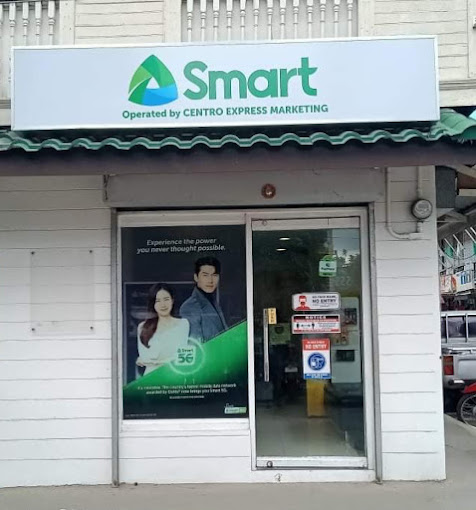
SMART STORE - MARINDUQUE

Location: Centro Express Marketing, 10 De Octobre St., Brgy., San Miguel, Boac, Marinduque Get Directions ]
Schedule: Monday - Friday 8:30AM - 5:30PM

Smart Store in Boac, Marinduque


So that's all Smart Stores located in South Luzon. For other branches in Metro Manila, Luzon, Visayas and Mindanao, see the list below:


RELATED ARTICLES


List of SMART Store Branches in South Luzon (with Location and Schedule)


In the heart of Makati, where gleaming skyscrapers pierce the skyline and the rhythm of the city never slows, lies Ayala Avenue—the Philippines' own answer to Wall Street. More than just a major thoroughfare, Ayala Avenue is the pulse of Metro Manila’s financial district, home to some of the country’s most powerful companies, upscale residences, cultural spaces, and green escapes.

Whether you're a business traveler, curious tourist, or city resident, this guide will walk you through everything you need to know about Ayala Avenue.


Where is Ayala Avenue?

Ayala Avenue runs diagonally through Makati Central Business District (CBD), stretching from Gil Puyat Avenue (Buendia) to EDSA. It’s one of the most well-maintained and organized areas in Metro Manila, with wide sidewalks, underpasses, pocket parks, and clean streets.

Ayala Avenue

Quick Facts About Ayala Avenue


Namesake: Zóbel de Ayala family

Location: Makati City

Maintained by: Makati Central Estate Association & Ayala Land

Length: 2.3 km (1.4 mi)

Construction Completion: 1950s

North End: Metropolitan Avenue

South End: AH 26 (N1) / EDSA

Major Junctions: Gil Puyat Avenue (N190), Makati Ave, Paseo de Roxas, V.A. Rufino St.

Restrictions: Trucks, pedicabs, and tricycles not allowed from Gil Puyat to EDSA


Loading...

Why It’s Iconic


Business Hub: Ayala Avenue is lined with headquarters of top banks, insurance firms, and multinational corporations such as BPI, RCBC, and SGV.

Historical Significance: The area was developed by Ayala Corporation on what used to be part of Hacienda Makati, turning it into the country's premier business district in the post-war years.

Cultural and Civic Centers: Art installations, the Ayala Triangle Gardens, and monuments such as the Ninoy Aquino Monument line the street.


Landmark Buildings on Ayala Avenue

Ayala Avenue is home to an impressive roster of corporate headquarters, financial institutions, and iconic towers. Notable buildings include:

G.T. International Tower

Ayala Tower One – Headquarters of Ayala Corporation and former Philippine Stock Exchange trading floor

RCBC Plaza – Headquarters of Rizal Commercial Banking Corporation

The Enterprise Center – Twin-towered neoclassical landmark

PLDT Tower – Headquarters of PLDT, Inc.

Security Bank Center – HQ of Security Bank Corporation

Smart Tower – HQ of Smart Communications

Sycip, Gorres, Velayo & Co. (SGV) Building

G.T. International Tower

Alphaland Makati Place

Ayala North Exchange

LKG Tower

NEX Tower

Makati Sky Plaza

PeopleSupport Center

Robinsons Summit Center

STI Holdings Center

L.V. Locsin Building

Insular Life Building

SSS Makati Building

PNB Makati Center (formerly Allied Bank Center)


What to See and Do on Ayala Avenue


Ayala Triangle Gardens

✔ Visit Ayala Triangle Gardens
  • A rare patch of green in the city center, this urban park offers a refreshing escape. Enjoy casual strolls, dine at open-air restaurants, or watch the Festival of Lights every December.


✔ Explore the Ayala Museum
  • Just off Ayala Avenue, the newly renovated Ayala Museum houses pre-colonial gold, dioramas of Philippine history, and rotating exhibitions of contemporary Filipino art.


✔ Marvel at the Architecture
  • Buildings like The Enterprise Center, RCBC Plaza, and Ayala Tower One are not only business centers—they're also architectural landmarks.


✔ Shopping and Dining
  • From high-end malls like Greenbelt and Glorietta to fine-dining spots and rooftop bars, Ayala Avenue offers something for every taste and budget.


Transportation and Accessibility


MRT Access: The Ayala Station (MRT-3) is located near EDSA and connects easily to buses, jeepneys, and P2P shuttles.

Walkability: Ayala Avenue is one of the most pedestrian-friendly roads in the Philippines, with underground walkways and elevated footbridges.

Ride Hailing: Grab and taxis are readily available, though traffic can build up during rush hours.

PUJs at Ayala Avenue

Pedestrian-Friendly Features


Pedestrian Underpasses: Found at Parkway Drive, Legazpi Street, Paseo de Roxas, V.A. Rufino, and Salcedo/H.V. Dela Costa intersections

Buendia Freedom Park

The monuments of Benigno Aquino Jr. and Gabriela Silang

Ayala Triangle Gardens: A lush green oasis amid corporate high-rises, perfect for relaxing, jogging, or dining


Car-Free Sundays

Since September 2023, a section of Ayala Avenue—from Salcedo and H.V. Dela Costa Streets to West and Fonda Streets, including parts of Paseo de Roxas and Makati Avenue near Ayala Triangle Gardens—is closed to traffic every Sunday from 6:00 AM to 10:00 AM.


Branded as “Car-Free Sundays,” the initiative by Ayala Land and Makati City Government promotes:

  • Cycling
  • Jogging
  • Skating
  • Pet walkin
  • Outdoor group fitness

This is part of a growing push toward a greener, more pedestrian-friendly Makati CBD.


Where to Stay


Makati Shangri-La – Classic luxury with views of the avenue.

Fairmont Makati – Modern, elegant, and centrally located.

Holiday Inn & Suites Makati – Directly connected to Glorietta Mall.


Insider Tips


Business Rush: Avoid peak hours (7–10 AM, 5–8 PM) if you're just exploring.

Best Photo Spots: Try rooftops at the Ayala North Exchange or rooftop bars like Mistral at Raffles for sweeping views.

Holiday Lights: Visit in December for the annual Ayala Triangle light and sound show, a festive treat for locals and tourists alike.


Nearby Attractions


Legazpi Sunday Market – A weekend organic market just a short walk away.

Washington SyCip Park – A serene pocket park ideal for quiet reading or meditation.

Salcedo Village – Home to boutique restaurants and art galleries.


Final Thoughts

Ayala Avenue is more than just a business road—it’s a living, breathing symbol of modern Manila. It blends the energy of commerce with culture, greenery, and elegance. Whether you’re here to close a deal, enjoy an exhibit, or simply soak in the city vibes, Ayala Avenue delivers the perfect balance of work, leisure, and sophistication.


Ayala Avenue: Guide to Makati’s Financial and Cultural Powerhouse