Showing posts sorted by relevance for query Gcash. Sort by date Show all posts
gcash customer service 24/7 gcash customer service chat gcash customer service landline gcash submit ticket gcash support email how to fix gcash submit ticket gcash hotline number 2022 gcash customer complaint

Here's how to reach GCash support.


Are you having problems with your GCash transfer, cash-in or withdrawal? Instead of ranting about it on social media, you may call the GCash hotline number to get much-needed support and assistance. While GCash is arguably the most popular mobile wallet app in the Philippines, it is not without its share of problems. Some GCash customers complain that their cash transactions take a long time to complete.

Good thing, there are several ways to contact GCash customer service through telephone, email and chat to help resolve any issues you are having.

RELATED: GCASH: How to Register, How to Verify, How to Cash-in

Loading...

For any GCash-related concern, you can reach GCash Support through any of the following support channels:

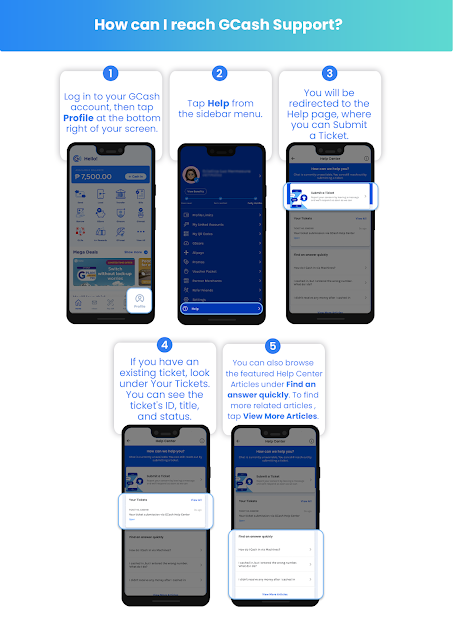
Follow these steps to reach GCash Support through the GCash App.

HELPFUL ITEMS YOU CAN USE TO SAVE MONEY!

Here's my list of useful items for you to save or earn money wisely:

Shopee is my go-to app for things I needed like the ones above. If you'd like discounts and vouchers, you may get the best offers here:

Use the GCash App

What better way to ask for support than within the GCash app itself? Just open the GCash app and tap the menu icon. Select Help on the sliding menu to access the Help Center.

You have the option to chat with a GCash customer service agent or to submit a ticket. To submit a support ticket, tap Submit a Ticket and enter the required information. Here are the steps you can follow to submit a ticket on GCash app:

STEP 1: Log in to your GCash account, then tap Profile at the bottom right of your screen. 

STEP 2: Tap Help from the sidebar menu.

STEP 3: You will be redirected to the Help page, where you can Submit a Ticket.


STEP 4: If you have an existing ticket, look under Your Tickets. You can see the ticket's ID, title, and status.


STEP 5: You can also browse through the featured Help Center Articles under Find an answer quickly. To find more articles that are related to your concern, tap View More Articles to open the GCash Help Center.


You can check for updates on your support tickets on the Help Center page. You will also be informed via email when you get an update on your ticket.


Help in the GCash App

Here is a summary of how to reach GCash Support through the GCash App.


Call 2882

If your support request is urgent, you may call the GCash hotline number 2882 to speak to a customer service representative. The GCash hotline is available everyday from Monday to Sunday, 8:00 AM to 5:00 PM and is toll-free for Globe subscribers.

PLDT, Smart and other non-Globe subscribers may call (02) 7730-2882. Airtime and long-distance charges may apply.


Send an Email

Another way to contact GCash support is to send an email to support@gcash.com.


Send a Message on Twitter

If you have a Twitter account, you can tweet or send a direct message to the official GCash page on Twitter @gcashofficial. Include your ticket number if you have already submitted a support ticket.


GCash is a mobile wallet app that lets you instantly pay bills, buy load, send money, shop, and more – all in the safety of your own home!


Acknowledgement: This article is sponsored by Usapang Hanapbuhay.

Bisitahin ang Usapang Hanapbuhay Facebook Group para sa iba pang tips at mga diskarte sa pera!


Like Usapang Hanapbuhay Facebook page for other updates!
 gcash customer service 24/7 gcash customer service chat gcash customer service landline gcash submit ticket gcash support email how to fix gcash submit ticket gcash hotline number 2022 gcash customer complaint  gcash login gcash apk gcash online gcash register gcash install gcash international gcash account gcash app for pc
How to Contact GCash Hotline and Customer Service

gcash login gcash register gcash app for pc gcash account gcash login pc gcash login without app how to use gcash gcash logo

Life is G!


Gcash has been part of day-to-day life of many Filipinos today and became more popular after the COVID-19 pandemic. Who doesn't like the hassle-free service where you can manage, send and receive money using ONLY your mobile phone?

There's no doubt that someone like me and other people are happy to have Gcash without the need to open a bank account!

In this guide, I will show you how to register, how to verify and how to use your Gcash account.

Loading...

How can I create a GCash account?

Turn your mobile phone into a secure virtual wallet when you register for a GCash account. Instantly pay bills, buy load, send money, shop, and more--all in the safety of your own home!

You can register through any of the following:
  • GCash App
  • *143# (USSD) for Globe/TM subscribers


Register via the GCash App

STEP 1: Go to the Playstore/App Store and search for the GCash App.

STEP 2: Download and install GCash.

STEP 3: Launch the GCash app and key in your current mobile number, then tap Next.

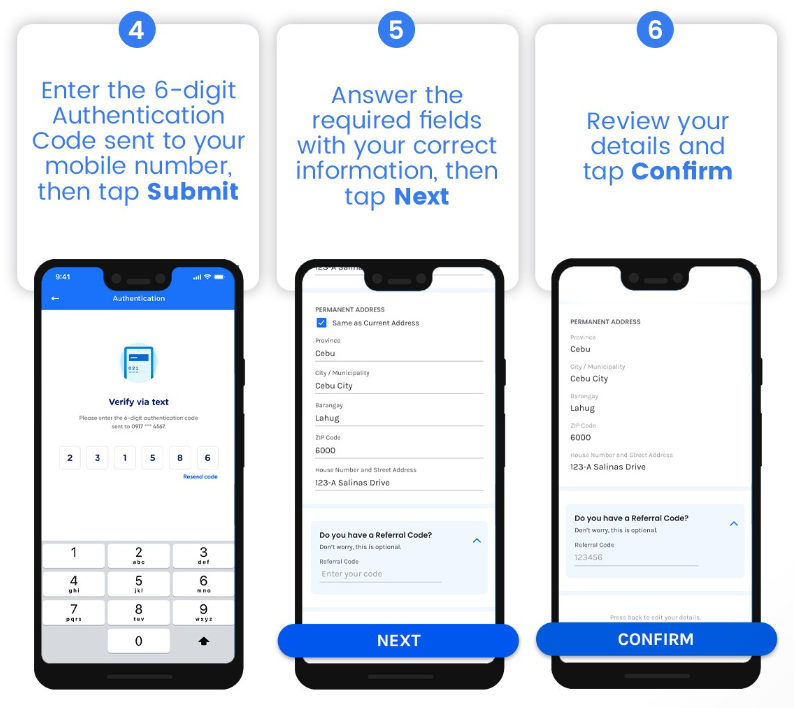
STEP 4: Enter the 6-digit Authentication Code sent to your mobile number, then tap Submit.
  • Tap Resend Now if you didn’t get the code.

STEP 5: Answer the required fields with your correct information, then tap Next.

STEP 6: Review your answers, then tap Next.
  • Tap the "Back App Arrow" button to edit your information.
  • If you have a referral code, tap the dropdown and enter the code.

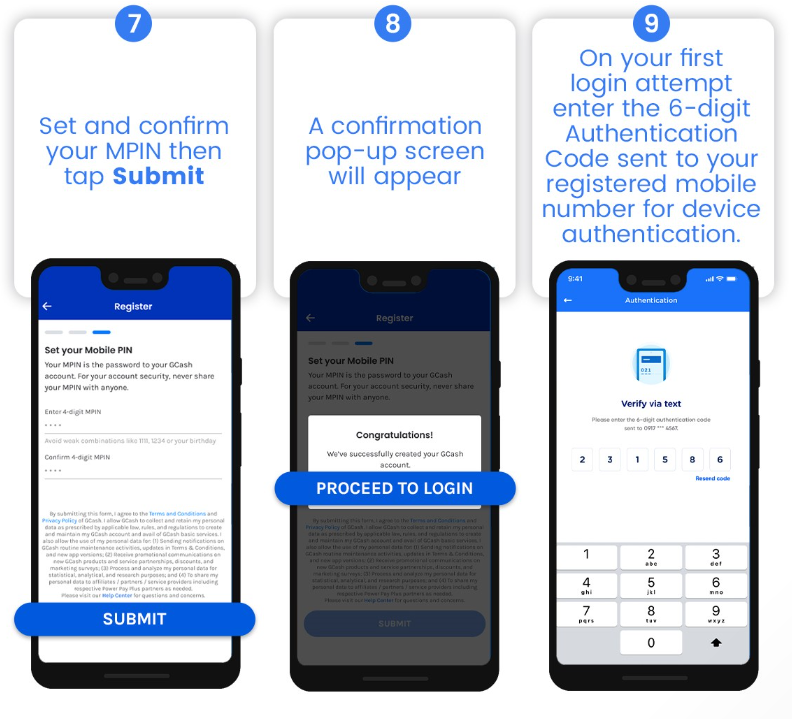
STEP 7: Set and confirm your MPIN, then tap Submit.
  • Avoid easily guessable MPINs like your birthday, 1234, or the last four digits of your phone number.

STEP 8: Confirmation pop-up screen will be displayed. Tap Proceed to Login

STEP 9: On your first login attempt, enter the 6-digit Authentication Code sent to your registered mobile number for device authentication.
  • You may need to authenticate your device again after 90 days. When that happens, enter the new code on the app for re-authentication.
  • Confirmation screen will be displayed. Log in with your MPIN.

Here is a summary of how to create a GCash account:

create gcash account how to create gcash account how to register gcash how to make gcash account gcash sign up gcash create account gcash register gcash register new account gcash-registered mobile number how to register in gcash how to make a gcash account how to open gcash account gcash register 2023 how to register to gcash how to create new gcash account what email address did you use to register to gcash how to create gcash register gcash number create new gcash account how to register gcash account how to create a gcash account how to apply gcash how to make gcash register gcash account how to have gcash


Register via *143# (USSD)

NOTE: This process is only available to Philippine-issued SIM.

STEP 1: Dial *143#.

STEP 2: Enter the option for GCash, then tap Send.

STEP 3: Enter the option for Register, then tap Send.

STEP 4: Set and verify your MPIN.

Tip: Avoid easily guessable MPINs like your birthday, 1234, or the last four digits of your phone number.

STEP 5: Provide your information as prompted.

Tip: If you entered an email address, key in 1 to confirm or 2 to go back. 

STEP 6: Enter the option for Register.

STEP 7: A confirmation screen will be displayed. 

STEP 8: Download and install the GCash App.

HELPFUL ITEMS YOU CAN USE TO SAVE MONEY!

Here's my list of useful items for you to save or earn money wisely:

Shopee is my go-to app for things I needed like the ones above. If you'd like discounts and vouchers, you may get the best offers here:

How do I get Fully Verified?

Verifying your GCash opens up a lot of benefits in using your GCash app such as:
  • Access all GCash features and services
  • Increased wallet and transaction limits 
  • Secures you and the people you transact with


Access all GCash features and services

Here are the additional GCash features and services you can enjoy when you fully verify your account:


Note: For customers using a non-Philippine-issued SIM, they can enjoy the following services: International remittance, Express Send (only to Fully Verified GCash Users), Instapay Cash In, Payoneer Cash In, Pay Bills (Local billers only), Buy Load (Local prepaid only), Bank transfer (Instapay)


Increased wallet and transaction limits  

When you undergo full verification, your wallet limit increases to P100,000, which means you will be able to keep up to P100,000 in your GCash wallet at any given time. READ: How to Increase GCash Wallet and Transaction Limits

Secures you and the people you transact with

Transacting with fully verified users is more secure because:
  • GCash has a copy of valid documents proving the legitimacy of the user’s identity
  • Users provide personal information to support proof of their identity
  • Users take a selfie scan which proves that they are human and not a bot


Here’s how you verify your account

Prepare a valid (not expired) government ID that you have on hand.

Here's a list of recommended IDs to submit to immediately get verified:
  • Driver's License
  • Passport
  • Philhealth Card
  • UMID
  • Voter's ID
  • SSS ID
  • PRC ID
  • Postal ID


Tips on how to choose the right ID for your application:
  • Your ID must be valid (not expired) with a validity period indicated on your ID
  • The name on your ID must match the name on your GCash account
  • Your ID must have an ID number
  • The ID must be laminated if it is a paper type
  • Your ID must have your signature
  • ID must be in good physical condition and not tampered


To learn more about the accepted IDs for Verification, go to What are the IDs I can submit to get verified?

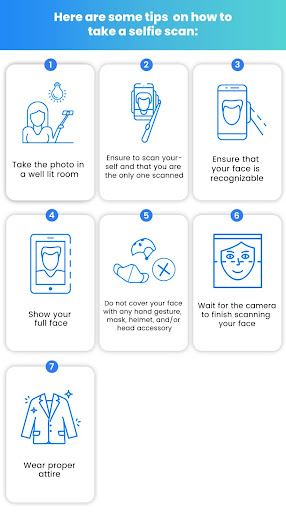
Prepare to take a selfie

tips_on_taking_selfie_scan.jpeg


Follow these steps to fully verify your GCash account:

STEP 1: Launch the GCash App 

STEP 2: Tap the Profile icon on the bottom right of the screen

STEP 3: Tap Verify Now below your name

STEP 4: Tap Get Verified 

STEP 5: Choose from the list a valid (not expired) government ID that you have on hand

Reminder: Make sure to choose the correct ID type, if the photo of the ID you choose to take photos of doesn't match the ID type selected in this step, your application will be rejected.

The following IDs will not be accepted
  • Barangay ID 
  • TIN ID
  • School ID 
  • Company ID 

STEP 6: Take photos of the valid government ID that you chose
  • Make sure the information is clear and readable.
  • If you will submit your Alien Certificate of Registration (ACR), you will need to take a picture of the front and back of your ID.
  • Not satisfied with the photo of your ID? Tap Retake to get a better quality photo.

STEP 7: Tap Submit

STEP 8: Read the guidelines on how to properly take a photo of yourself then tap Next

To verify your identity, you will need to take a photo of yourself through a selfie scan.

STEP 9: Take a selfie scan
  • Position your face within the frame, then wait for the camera to scan your face. Blink when instructed.
  • Make sure your photo comes out clear. 
  • Not satisfied with your photo? Tap Retake to get a better quality photo.

STEP 10: Fill up the form with the required information

Fill up the form with correct information to avoid being rejected due to inconsistent details.

STEP 11: Tap Next

STEP 12: Review your information

Ensure that the details provided are correct and accurate such as your ID Type, ID Number, name, birth date, and address to avoid rejection. 

To change details, you can go back and edit the form by tapping the arrow on the upper left corner.

STEP 13: Read the Terms and Conditions and tick the box to state that you agree to the Terms and Conditions. Tap Confirm to submit your application.

You will see a confirmation screen that your application has been submitted. Check the confirmation screen to know how long it will take for us to review your application. 

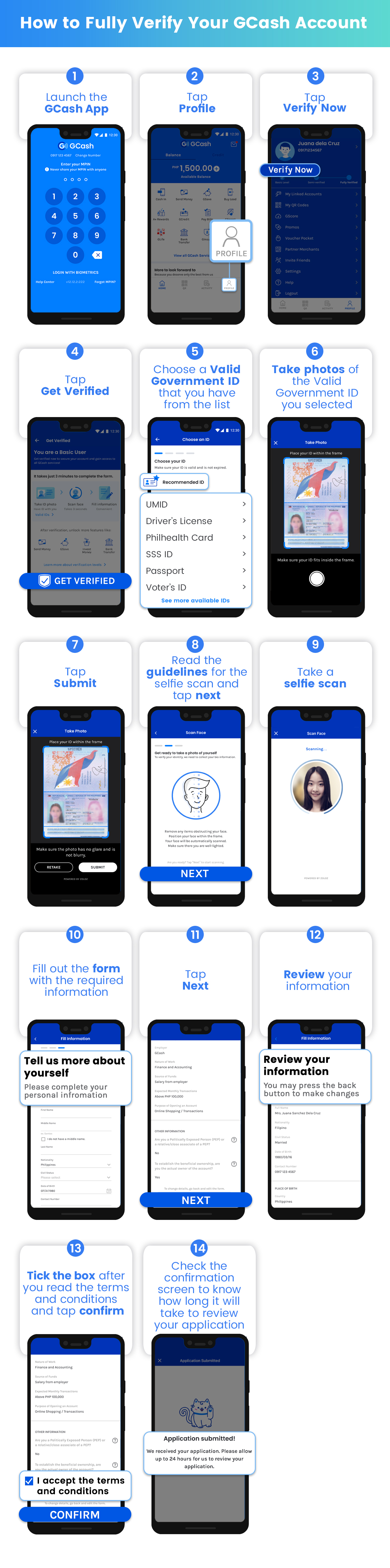
Here’s a summary on how to fully verify your GCash account:

How_to_Fully_Verify_Your_GCash_Account.jpg

How to Cash-In to GCash (and Cash-Out)

There are several ways to Cash-In to your GCash account. Here are some of the most commonly used cash-in options:

Is there a fee to Cash In?

Certain fees apply to specific methods of cashing in in GCash. Tap or click on your preferred cash in method below to learn more about the fees for cashing in. (See complete list of possible fees from GCash)

Cash In via Online Banking
Cashing in is free of charge for the following cash in channels:
  • BPI
  • UnionBank

You can also cash in from your preferred bank’s website or app using InstaPay. GCash today is partnered with 40+ banks.

Partnered banks that use InstaPay may incur service fees that vary per bank. To know more about your preferred bank’s service fee, go to list of bank Apps that use InstaPay.

Cashing in via PayPal is also free of charge.


Where can I Cash Out?

You can cash out at any BancNet and/or MasterCard affiliated ATM or at any GCash Partner Outlet

Simply look for the logo of either Mastercard or BancNet on the ATM.  

Image result for mastercard logo png

Image result for bancnet logo png


You can also cash out from any of the following GCash Partner outlets:
  • Cebuana Lhuillier
  • CVM Pawnshop
  • DA5
  • ECPay
  • ExpressPay
  • HanepBuhay
  • Jaro Pawnshop
  • Panalo Express
  • PeraHUB
  • Posible
  • Puregold
  • Robinsons
  • SM Store
  • Tambunting Pawnshop
  • TrueMoney
  • Villarica Pawnshop
  • VIP Payments Center

Each Partner Outlet has its own cash out steps. You can view these via the GCash App.


ABOUT GCASH

GCash is a Philippine mobile wallet, mobile payments and branchless banking service. Introduced in 2004, it is owned by Mynt (formerly Globe Fintech Innovations), which is a joint venture between Ant Group, an affiliate company of the Alibaba Group and the operator of the world's leading open digital lifestyle platform, Alipay; Ayala Group of Companies, one of the Philippines' largest business conglomerates; and Globe Telecom, one of the Philippines' largest telecommunications companies (on Globe's side, GCash is under 917Ventures).

As of 2019, it had 20 million active users and more than 63,000 partner merchants in the Philippines. However, in two years, owing to the rise of digital payments in the Philippines due to the COVID-19 pandemic, these figures more than doubled, with 46 million active users and 2.5 million merchants and sellers as of August 2021, making GCash the country's undisputed mobile wallet giant.


Acknowledgement: This article is sponsored by Usapang Hanapbuhay.

Bisitahin ang Usapang Hanapbuhay Facebook Group para sa iba pang tips at mga diskarte sa pera!


Like Usapang Hanapbuhay Facebook page for other updates!
gcash login gcash register gcash app for pc gcash account gcash login pc gcash login without app how to use gcash gcash logo create gcash account how to create gcash account how to register gcash how to make gcash account gcash sign up gcash create account gcash register gcash register new account gcash-registered mobile number how to register in gcash how to make a gcash account how to open gcash account gcash register 2023 how to register to gcash how to create new gcash account what email address did you use to register to gcash how to create gcash register gcash number create new gcash account how to register gcash account how to create a gcash account how to apply gcash how to make gcash register gcash account how to have gcash

COMPLETE GCASH GUIDE: How to Register, How to Verify (and Fully Verify), How to Cash-in & Cash-out

gcash cash in bpi fee bpi to gcash transfer fee 2022 gcash cash in bpi maintenance gcash cash in bpi problem 2022 bpi to gcash transfer limit how to transfer gcash to bpi without fee bpi to cash bpi to gcash transfer delay

In this guide, you will learn on how to link and cash-in using your BPI account to your GCash account.


Did you know? You can use link your BPI account to cash-in to GCash. Here's how.

RELATED: How to link a UnionBank Account in the GCash app

Loading...

To link your BPI Account, follow these steps:

STEP 1: On your GCash app, tap Profile.

STEP 2: Tap My Linked Accounts.


STEP 3: Select BPI Account and input your BPI Username and Password.

HELPFUL ITEMS YOU CAN USE TO SAVE MONEY!

Here's my list of useful items for you to save or earn money wisely:

Shopee is my go-to app for things I needed like the ones above. If you'd like discounts and vouchers, you may get the best offers here:

Once the link is successful, you will be able to add funds from your BPI bank account to your GCash wallet.


Here is a summary of the steps on how to link your BPI Account to GCash:


How to Cash In using my linked BPI Account?

To Cash In using your linked BPI Account, follow these steps:

STEP 1: On your GCash homepage, tap Cash In.

STEP 2: Under Online Banks, Tap BPI.

STEP 3: Enter the amount you want to add to your account and select which account to cash in from. Tap Next.

Note: Users may now adjust their BPI daily limits via the BPI Mobile app. Visit BPI Cash In FAQs to learn more.

STEP 4: Tap Confirm to continue Cash In.

Note: Official GCash representatives will never ask for your one time password.

Here is a summary of how to cash in to your GCash Wallet using your BPI linked account.


Once submitted, a confirmation screen will appear once you have successfully cashed in through BPI. This should reflect immediately on your GCash dashboard. You will also receive an email and confirmation text of your Bank to GCash transaction.


Is there a fee to cash in?

Cashing in is free of charge for BPI.


Acknowledgement: This article is sponsored by Usapang Hanapbuhay.

Bisitahin ang Usapang Hanapbuhay Facebook Group para sa iba pang tips at mga diskarte sa pera!


Like Usapang Hanapbuhay Facebook page for other updates!
 how to enroll gcash in bpi mobile app how to link gcash to bpi account bpi online how to transfer money from bpi to gcash without linking is it safe to link bpi account to gcash how to transfer gcash to bpi without fee benefits of linking bpi to gcash gcash to bpi linked account fee gcash cash in bpi fee bpi to gcash transfer fee 2022 gcash cash in bpi maintenance gcash cash in bpi problem 2022 bpi to gcash transfer limit how to transfer gcash to bpi without fee bpi to cash bpi to gcash transfer delay

How to Link BPI to GCash App (Cash-In for FREE)

payoneer to gcash transfer fee payoneer to gcash fee 2022 payoneer to gcash problem payoneer to gcash how many days how to cash in payoneer can i withdraw money from payoneer without verification payoneer to gcash minimum how to withdraw money from payoneer in philippines

Here's your complete guide on how to register, link and cash in with your Payoneer account to GCash.


Before you link your Payoneer account to GCash, make sure of the following:
  • Your GCash account must be Fully Verified; and 
  • Your Payoneer account must be verified by Payoneer. An email confirmation will be sent within three (3) business days after you submit your application. You can also view your status by logging in to your Payoneer account on the website or mobile app.

Loading...

How can I register to Payoneer using GCash?

To register to Payoneer using the GCash app, follow the steps below:

STEP 1: On the lower right corner of the GCash homepage, tap Profile 

STEP 2: Select My Linked Accounts.

STEP 3: Tap on Payoneer.

STEP 4: Select Create an Account.

STEP 5: Tap on Register with GCash for your GCash information to be filled out instantly, or select  Create an Account to enter your details manually.

STEP 6: Fill out the necessary information to successfully create an account.

STEP 7:  A confirmation screen will  appear to inform you that your application is being processed. Tap Okay to exit.


Once you have submitted your Payoneer application, you can view your account status at any time by logging in to your Payoneer account on the website or mobile app. New applications are usually reviewed immediately, but some may take up to three (3) business days. 

You will receive an email from Payoneer that your application is being reviewed. Here is a sample email below:


Once approved, you will receive another email confirmation with further details.

In some situations, you may be asked to provide extra details such as a copy of your ID, Certificate of Incorporation, bank statement or other documents. Please be sure to check the spam, trash, and other folders of the email address associated with your account for any updates regarding your application.


Once you receive this email, you will already be able to link your Payoneer account to GCash.

HELPFUL ITEMS YOU CAN USE TO SAVE MONEY!

Here's my list of useful items for you to save or earn money wisely:

Shopee is my go-to app for things I needed like the ones above. If you'd like discounts and vouchers, you may get the best offers here:

How can I link my Payoneer to GCash?

To link your Payoneer account to GCash, follow these steps:

STEP 1: On the GCash homepage, then tap Profile.

STEP 2: Tap on My Linked Accounts.

STEP 3: Tap on Payoneer.

STEP 4: Tap Link Account.

STEP 5: Enter your Payoneer login credentials

STEP 6: Enter the verification code received via SMS.

STEP 7:  Linking is being processed. Wait for confirmation via text message.

Once you're linked, you can now Cash In with Payoneer and add funds to your GCash.

Note: For security purposes, if you have not used your Payoneer to cash in for more than a month, you may be prompted to re-link your Payoneer to GCash.

RELATED: How to link a BPI Account in the GCash app


How can I cash in to GCash with my Payoneer account?

To cash in to GCash with Payoneer, follow these steps:

STEP 1: On the GCash homepage, tap Cash In

STEP 2: Select Payoneer

STEP 3: Select the currency balance and input your desired amount. Tap Next.

STEP 4: In the cashier page, the amount will be converted in PHP. Review the amount carefully, then select Confirm.

STEP 5: Input the OTP code that will be sent to your GCash-registered mobile number.

A blue confirmation page will show that your Cash In is being processed. You will also receive an SMS notification to confirm your cash in was successful. This will reflect on your GCash wallet balance.

RELATED: GCash List of Fees 

Is there a limit to the amount I can cash in from Payoneer?

Payoneer allows withdrawals of up to P100,000 every 30 days. At the same time, GCash wallet limits for Cash In still apply. As the service is for Fully Verified users only, the wallet limit for GCash is 100,000 per month.

For more information on this, please visit - Wallet and Transaction Limits

Acknowledgement: This article is sponsored by Usapang Hanapbuhay.

Bisitahin ang Usapang Hanapbuhay Facebook Group para sa iba pang tips at mga diskarte sa pera!


Like Usapang Hanapbuhay Facebook page for other updates!
 payoneer to gcash transfer fee payoneer to gcash fee 2022 payoneer to gcash problem payoneer to gcash how many days how to cash in payoneer can i withdraw money from payoneer without verification payoneer to gcash minimum how to withdraw money from payoneer in philippines

How to Register, Link and Cash-In Your Payoneer to GCash

can i pay philippine airlines thru gcash how to pay airline ticket using gcash how to pay philippine airlines in 7/11 cebu pacific gcash payment how to pay agoda using gcash philippine airlines mode of payment can i pay airasia with gcash how to pay traveloka via gcash

This is your complete guide on how to pay for Philippine Airlines ticket using GCash.


Paying for your Philippine Airlines ticket? You can now do it online with GCash, anytime, anywhere. With the Pay Bills feature, you can pay your Philippine Airlines ticket either using your GCash fund or GCredit.

RELATED: GCash Guide On How To Cash-In With CLIQQ At 7-Eleven

Loading...

How to Pay Philippine Airlines using GCash

Here are the steps on how to pay for your bill:

STEP 1: On the main dashboard, tap the Pay Bills icon to start the process.

STEP 2: Under Biller Categories, select Transportation.

STEP 3: From the list of partner billers, search and choose Philippine Airlines (PAL).


STEP 4: Next, enter the required details needed for the transaction. Click the NEXT button to continue.

STEP 5: Review your transaction, then click the CONFIRM button to process the payment.

STEP 6: Once the payment is successful, the payment reference number with the details of the transaction will be enumerated. Click the DONE button to go back to the main dashboard.

You will receive an SMS on your registered mobile number once the bill payment is successful. You will also receive the Payment Receipt in the email address you have provided while processing the payment.


HELPFUL ITEMS YOU CAN USE TO SAVE MONEY!

Here's my list of useful items for you to save or earn money wisely:

Shopee is my go-to app for things I needed like the ones above. If you'd like discounts and vouchers, you may get the best offers here:

Paying Philippine Airlines Using GCash

Here are important things to remember when paying Philippine Airlines using your GCash account:
  • The payment will be posted real time
  • There's no additional fee
  • The biller accepts GCredit payment


For other billers, see List of Transportation Billers that can be paid using GCash.

Acknowledgement: This article is sponsored by Usapang Hanapbuhay.

Bisitahin ang Usapang Hanapbuhay Facebook Group para sa iba pang tips at mga diskarte sa pera!


Like Usapang Hanapbuhay Facebook page for other updates!
 how to pay electric bill using gcash how to pay gcredit without using gcash gcash pay bills not available how to pay water bills using gcash pay bills gcash fee gcash bills payment list gcash bills payment email how to use gcredit in gcash  can i pay philippine airlines thru gcash how to pay airline ticket using gcash how to pay philippine airlines in 7/11 cebu pacific gcash payment how to pay agoda using gcash philippine airlines mode of payment can i pay airasia with gcash how to pay traveloka via gcash

How to Pay Philippine Airlines Using GCash (Transaction Fee & Timeframe)

gcash cash in unionbank fee unionbank to gcash transfer fee 2022 union bank transfer to gcash not received gcash to unionbank free unionbank to gcash via instapay unionbank to gcash how long unionbank to gcash limit benefits of linking unionbank to gcash

In this guide, you will learn on how to link and cash-in using your UnionBank account to your GCash account.


Did you know? You can use link your UnionBank account to cash-in to GCash. Here's how.

RELATED: How to Link and Cash-In with Your BPI Account in the GCash app

Loading...

To link your UnionBank Account, follow these steps:

STEP 1: On the lower right corner of the GCash homepage, click Profile.

STEP 2: Tap on My Linked Accounts.

STEP 3: Select UnionBank and input your Username and Password.

STEP 4: Enter the One-time password sent to your UnionBank registered mobile number and tap Submit.

STEP 5: Select your preferred account. You can only link one account at a time.


Once the link is successful, you will be able to add funds from your UnionBank account to your GCash wallet.

Here is a summary of the steps on how to link your UnionBank Account to GCash:


HELPFUL ITEMS YOU CAN USE TO SAVE MONEY!

Here's my list of useful items for you to save or earn money wisely:

Shopee is my go-to app for things I needed like the ones above. If you'd like discounts and vouchers, you may get the best offers here:

How do I cash in using my linked UnionBank account?

To Cash In using your linked UnionBank, follow these steps:

STEP 1: On your GCash homepage, tap Cash In.

STEP 2: Under Online Banks, Tap UnionBank.

STEP 3: Enter the amount you want to add to your account. Click Next.

STEP 4: Tap on Confirm to continue cash in.


Is there a fee to cash in?

Cashing in is free of charge for UnionBank.

RELATED: GCash List of Fees 


IMPORTANT NOTE: The rates, contact details and other information indicated in this post are accurate from the time of writing but may change without IMFWJ's notice. Should you know the updated information, please let us know by leaving a message in the comment box below.

Acknowledgement: This article is sponsored by Usapang Hanapbuhay.

Bisitahin ang Usapang Hanapbuhay Facebook Group para sa iba pang tips at mga diskarte sa pera!


Like Usapang Hanapbuhay Facebook page for other updates!
how to link gcash to union bank benefits of linking unionbank to gcash how to enable internet browser banking unionbank why i can't link my unionbank to gcash union bank online union bank to gcash transfer fee how to unlink unionbank to gcash union bank to gcash fee 2022 gcash cash in unionbank fee unionbank to gcash transfer fee 2022 union bank transfer to gcash not received gcash to unionbank free unionbank to gcash via instapay unionbank to gcash how long unionbank to gcash limit benefits of linking unionbank to gcash

How to Link and Cash-In Using UnionBank on GCash App

how to transfer money from paypal to gcash without linking how to transfer money from paypal to gcash below 500 link paypal to gcash paypal to gcash transfer fee minimum amount to transfer paypal to gcash how to link gcash to paypal 2022 how to cash in paypal i can't link my paypal to gcash

Here's your complete guide on how to register, link and cash in with your PayPal account to GCash.


What are the requirements to link a PayPal account?

To be able to link your PayPal account to GCash:
  • Your GCash account must be fully verified.
  • Your first and last name on PayPal must be identical with your first and last name on your GCash account (e.g. Juan Dela Cruz and Juan De La Cruz will 
  • not match). Both accounts must be owned by the same person.
  • Your nominated email must match your login credentials for PayPal
  • The PayPal account must be set up in the Philippines.Remove your withdrawal limit on PayPal by verifying your credit card or bank account. This step should be completed before Cashing-In via PayPal to GCash.
  • To cash in from PayPal, users must first link their PayPal account to GCash.

Loading...

How do I link my PayPal to GCash?

To link your PayPal to GCash, follow these steps:

STEP 1: On the lower right corner of your GCash homepage, click on Profile.

STEP 2: Tap My Linked Accounts.

STEP 3: Select PayPal

STEP 4: Nominate the PayPal email account you are linking to GCash. 


STEP 5: Tap Link.

STEP 6: On the next screen click on Authorize.

STEP 7: Once redirected to the PayPal login page, input your PayPal account username and password.

STEP 8: Confirm your mobile number. Tap Continue.

Here is a summary of the steps on how to link your PayPal to GCash:


HELPFUL ITEMS YOU CAN USE TO SAVE MONEY!

Here's my list of useful items for you to save or earn money wisely:

Shopee is my go-to app for things I needed like the ones above. If you'd like discounts and vouchers, you may get the best offers here:

How do I cash in with PayPal?

To Cash In with PayPal, follow these steps:

STEP 1: On your GCash homepage, select Cash In.

STEP 2: Under the Global Partners and Remittance tab, select PayPal.

STEP 3: Enter the amount you wish to add to your wallet (minimum ₱500.00). Tap Next.  

STEP 4: Confirm the amount for cash in.

You will receive an email and SMS notification once the funds have been added to your GCash wallet. Note that most transactions will be processed within the next 24-48 hours. 

Tip: For seamless transactions, convert your PayPal funds into Peso (PHP) to proceed for withdrawal. If you currently do not have Philippine Peso added as a currency, login to your PayPal account to add the new currency balance.


PayPal Cash In FAQs

Are there transfer fees from PayPal to GCash?
There are no fees when you transfer money from PayPal to GCash.

I encountered the error “cash in via PayPal cannot be processed” or “cash in has been declined by PayPal”
PayPal may have placed limitations on your account due to one of the following reasons: unauthorized use, account limits, higher-risk activity, or an inactive account.

To resolve this issue, check your PayPal account for restrictions or needed verification, then relink to GCash to be able to cash in again.

I cannot cash in due to a “system error”
Either PayPal or GCash’s system may be under repair or it is experiencing time out. Please wait a few hours and then try to cash in again.

How long do I wait until my PayPal Cash In transaction is reflected in my GCash balance?
PayPal transactions may take up to 24-48 hours to be fully processed especially for new PayPal account users, however most transactions are instant.

My PayPal account has been deducted, but I have not received the amount in my GCash wallet.
There are a few reasons your money may not have pushed through:
  • PayPal may have temporarily placed your transactions on hold due to security precautions. It may take up to 1 - 2 business days for reversal of funds on PayPal to be fully processed.
  • Your GCash has reached the wallet limit for the month.
  • The money transfer was unsuccessful and your money will be returned to your PayPal account.
  • There was a system timeout that made the fund transfer unsuccessful.

Please wait for your money to be credited to your GCash wallet within two (2) business days.

If the funds have not been returned to your PayPal account after such time, please submit a ticket including the following details:
  • PayPal Email
  • PayPal Transaction ID
  • Transaction Date & Time
  • Amount
  • Screenshot of the transaction confirmation email sent by PayPal

How do I refresh my PayPal login access?
You may be prompted to re-link your PayPal account for security purposes. Simply follow these instructions on How do I re-link my PayPal email to my GCash account? to re-link your PayPal account.

Why can’t I link my PayPal account to GCash?
If you're having trouble linking your PayPal account to GCash, double check if you meet these requirements:
  • Your nominated email must exactly match your login credentials for PayPal.
  • Double-check your PayPal email to ensure the email you are inputting matches.
  • Your first and last name on PayPal must be identical with your first and last name on your GCash account (e.g. Juan Dela Cruz and Juan De La Cruz will not match). Both accounts must be owned by the same person.
  • The PayPal account must be set up in the Philippines.
  • Remove your withdrawal limit on PayPal by verifying your PayPal account.
  • Your GCash account must be Fully Verified.

How do I enable 2-step verification on PayPal to make my account more secure?
Add a layer of security to your PayPal account by enabling 2-step verification upon logging in.

To do this, simply login to your PayPal account, go to Security, click Set Up next to “2-step verification” and follow the instructions to activate.

Learn more about enabling this security feature in PayPal's official website.

I can’t “Close and Continue” when I link my PayPal account to GCash (For Android Users)
If you are using an Android device, disable the System Webview before you link your PayPal account.

Go to your Device Settings > App > Show System App and disable the Android System Webview from there. Then try linking your PayPal to GCash.

Acknowledgement: This article is sponsored by Usapang Hanapbuhay.

Bisitahin ang Usapang Hanapbuhay Facebook Group para sa iba pang tips at mga diskarte sa pera!


Like Usapang Hanapbuhay Facebook page for other updates!
 how to transfer money from paypal to gcash without linking how to transfer money from paypal to gcash below 500 link paypal to gcash paypal to gcash transfer fee minimum amount to transfer paypal to gcash how to link gcash to paypal 2022 how to cash in paypal i can't link my paypal to gcash

How to Link & Cash-In PayPal to GCash (Step-by-step Guide with FAQs)