Showing posts with label Smart Communications. Show all posts
smart card registration online https smart com ph sim registration smart sim registration failed sim card registration philippines sim card registration globe sim card registration online tnt sim registration link dito sim registration

You can now start registering your SIM card with Smart.


This is required in order to comply with the SIM registration law, which seeks to prevent the spread of spam messages and scams. The SIM Card Registration Act or RA 11934 mandates all SIM card users, both existing and new, to register their SIM cards with their respective telecommunications providers starting December 27, 2022.

Loading...

All local SIM cards, including eSIMs, are covered by the SIM Card Registration Act. All SIM card owners are required to register their SIM cards within 180 days from the date of the law’s effectivity. Failure to register your current or new Smart Prepaid SIM card within the specified period will result in deactivation, making it useless for voice calls, internet access, text messaging, and other mobile services. SIM card registration is totally free of charge

To see the SIM registration links for all networks, visit HOW TO REGISTER SIM CARD IN THE PHILIPPINES


Register Existing Smart Prepaid SIM

Active Smart Prepaid subscribers, prior to the start of SIM registration (December 27, 2022), have a deadline of April 26, 2023, to register their SIMs. If you fail to register within the period specified, your SIM will be deactivated automatically.

Therefore, you cannot use the SIM for calls, texts, and mobile data. However, a deactivated Smart Prepaid SIM card will be given a 5-day grace period to register and get reactivated. 

On April 25, 2023, Pres. Ferdinand Marcos Jr. approved the 90-day SIM registration extension.


What information do I need to have my SIM card registered?

You need to provide the following information:
  • Full name
  • Date of Birth
  • Sex
  • Address
  • Government ID with photo
  • Declaration that the ID presented is true and correct


WHERE TO BUY A SIM CARD IN THE PHILIPPINES

Here are the top mobile networks (where you can purchase and get a SIM card) in the Philippines:

Shopee is my go-to app for things I needed like the ones above. If you'd like discounts and vouchers, you may get the best offers here:

How to register your Smart SIM card

Smart Communications has outlined their respective methods for registering SIM cards. Here’s how to register your Smart SIM card online:

  1. Go to the official Smart SIM card registration website: https://simreg.smart.com.ph
  2. Enter your 10-digit mobile number (ex. 9191234567) and click the “Register” button.
  3. If your SIM card is eligible for registration, you will be sent a One Time PIN (OTP) text message on your phone.
    • For those with Mobile Prepaid Pocket WiFi or Home Prepaid WiFi devices, you would need to enter your device’s modem dashboard to access the inbox where you can find the OPT text message.
    • For Smart Bro subscribers can go here for instructions on viewing the OTP.

  4. Enter the OTP on the registration website. Take note that OTPs have an expiration date.
  5. Once your OTP has been validated, you can continue with the registration.
  6. Enter all the needed information: Full name, Date of Birth, Gender, Address, and Nationality.
  7. You will be asked to upload a valid ID and a selfie photo (as a declaration that the ID presented is valid and correct). For the list of accepted valid IDs, go here.
  8. You can also add your contact number and email address. This is optional.
  9. Double-check all information.
  10. Tick the check box of the telco’s privacy notice, Attestation of Completeness and Accuracy, and marketing and promotional permission (optional).
  11. Finish the registration process.
  12. You will be given a reference number that will appear on your screen to signify the completion of registration. Keep this reference number as proof of registration.

If you are a Smart subscriber and doesn't know if you already registered your SIM, here's How to Check if Your Smart SIM is Already Registered on simreg.smart.com.ph

For Talk 'N Text subscribers, you can follow the step-by-step guide for TNT Talk 'N Text SIM Card Registration.


How to register your Smart Postpaid SIM card

For Smart postpaid subscribers, you simply need to confirm the personal information and IDs you have submitted during your postpaid plan application.

To do this, just text YES to 5858. You shall then receive a confirmation message from Smart upon successful SIM Registration.


Accepted IDs for SIM card registration

Here's a list of accepted IDs you can use for SIM card registration:


Frequently Asked Questions

Here are the answers to the most asked questions about Smart Prepaid SIM registration.

How many SIM cards can be registered under a single user?
There's no limit as to how many SIMs may be registered under a subscriber's name.

How to register Smart Prepaid SIM if a user is a minor?
SIMs for minors (below 18 years old) shall be registered under the name of the parent or legal guardian. To register the SIM, they will be required to present an ID and the consent of the minor's parent or guardian.

How to transfer the ownership of a Smart Prepaid SIM card?
You can visit the nearest Smart Store to file a transfer of ownership.

What are the additional requirements for Smart Prepaid SIM for business?
For businesses and organizations to use Smart Prepaid SIMs, the following information is required:
  • Business name
  • Business address
  • Full name of authorized signatory

Moreover, businesses will be required to submit the following documents:
  • Certificate of Registration (SEC or DTI)
  • In the case of corporations, a duly adopted board resolution designating the authorized representative, and in the case of other juridical entities, a special power of attorney

I just recently switched to Smart via Mobile Number Portability. Should I still register my Prepaid SIM?
If you just recently transferred or switched to Smart through Mobile Number Portability, you should register your SIM again via the online portal.

I am currently abroad but using a Smart Prepaid SIM. Do I still have to register?
If you are traveling abroad and using Smart's roaming service, you need to register your SIM through Smart's online registration portal to avoid deactivation.

What are the requirements to register Smart Prepaid SIM as a foreigner in the Philippines?
Foreigners will be required to submit the following documents:
  • Required documents for foreign nationals visiting as tourists:
    • Passport (copy of the page where the visa is stamped)
    • Proof of address in the Philippines (like booking in a hotel or another type of accommodation)
    • Return Ticket to country of origin or any other ticket indicating the date and time of departure from the Philippines

  • Required documents for foreign nationals with other types of visas:
    • Passport (copy of the page where the type of visa is shown)
    • Proof of address in the Philippines
    • Other relevant document, whichever is applicable: (1) Alien Employment Permit by DOLE; (2) Alien Certificate of Registration Identification Card (ACRI Card) by Bureau of Immigration or other types of official ID card issued by any other visa-issuing agency; (3) School registration and ID for students; (4) Type of travel or admission document validity issued by the DOJ for Persons of Concern (POC)

Note that the validity of SIM cards issued to tourists is only 30 days, after which they will be deactivated. It can only be extended upon the presentation of an approved visa extension. On the other hand, foreigners with other types of visas can obtain SIMs without the 30-day restriction.

What will I do if I lose my mobile phone or device with my registered Smart Prepaid SIM?
If you lose your mobile device with your registered SIM card, contact Smart and provide your full name, address, birthday, and mobile number. You can contact Smart Communications through their official Facebook page (https://www.facebook.com/SmartCommunications), or you can report it to the nearest Smart Store. Your lost Smart Prepaid SIM will be permanently deactivated for your safety, and you will receive a new SIM with the same mobile number.


What if I submit false information and a fake ID card during SIM registration?
Individuals who submit fraudulent information or fake IDs during the SIM registration process will face six months to two years in prison or a fine between PHP 100,000 and PHP 300,000, or both.

What to do if I experience errors or problems during SIM registration?
You can contact Smart's customer service hotline at *888 for free, send a message to its Facebook Messenger (https://m.me/SmartCommunications), or report it to the Smart Store near you. Also, you can call the DICT complaint center via hotline number 1326.

SMART SIM REGISTRATION: Link & Step-by-step Guide for Prepaid and Postpaid Subscribers


Finally, I resolved my Smart SIM registration, here's how!


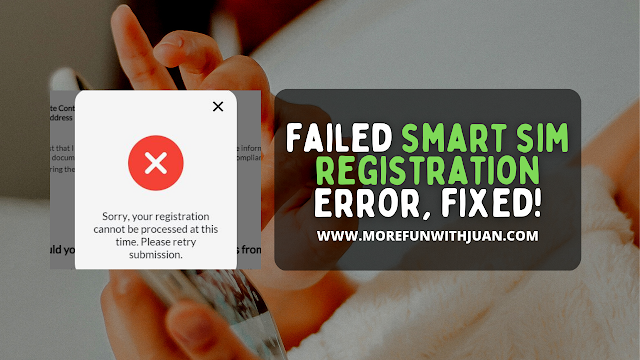
Last week, I tried to register my Smart SIM thru their website (for the Nth time!) However, I always get this message when I reach the last step of the process:


"Sorry, your registration cannot be processed at this time. Please retry submission."

So I tried to fix it right away and shared my whole experience on my last blog where I performed several troubleshooting steps and even chatted Smart's customer service for help. But as mentioned on my blog, the only answer I was given was to RETRY and RETRY.

Loading...

But that didn't really resolved my problem. Right? I still don't get my Smart SIM registered as of that moment and was hopeless knowing that I might get trouble with my OTPs in the future.

Until something came up unexpectedly (a news I didn't know was good and even better!)


Jane, who I chatted thru Smart's messenger (customer service) escalated my problem to someone who can look further to my problem. 

That someone gave me a call and asked me if I was able to successfully register my Smart SIM. Of course, I wasn't. This guy asked me next if the ID photo I uploaded for the registration was under the allowed size. I said, "yes" since (as far as I was aware of) the image was 5mb in size.

The fact that there was no warnings or signs that I didn't submitted the correct files for my IDs, there shouldn't be any problem, right?

Until...


I looked at the photo of my UMID and to my surprise, it's 5.2mb in size! That is more than the required size of image you can upload for registration which is under 5mb only. 

Out of my curiosity, I resized my ID photo and retried the SIM registration and guess what??? I successfully registered my Smart SIM, finally!

I was so happy and was a bit confused.

If you fail to register your SIM, it will be deactivated. To know more, visit SIM REGISTRATION DEADLINE: What Will Happen To Unregistered SIM Cards?


ATTRACTIONS TO SEE IN MANILA 

Klook.com

Anyway, the important thing is that my worries are gone and I have now the peace of mind with all my OTPs and verifications with my mobile number. I also got my 3GB Free Data a few minutes after I received the SMS confirmation that my SIM is already registered!


Failed Smart SIM Registration Error, FIXED!


You can't proceed with your SIM registration because of errors and failures of attempts? This guide will help you solve this problem with Smart (might work to Globe and DITO, too)!


In this guide, I will elaborate the steps I followed to try to fix a failed SIM registration I have experienced with Smart recently.

Loading...

ABOUT SIM REGISTRATION

First, this is the reason why I am a bit frustrated with my SIM and mobile number. The SIM Card Registration Act or RA 11934 mandates all SIM card users, both existing and new, to register their SIM cards with their respective telecommunications providers starting December 27, 2022.

All local SIM cards, including eSIMs, are covered by the SIM Card Registration Act. All SIM card owners are required to register their SIM cards within 180 days from the date of the law’s effectivity. Failure to register your current or new Smart Prepaid SIM card within the specified period will result in deactivation, making it useless for voice calls, internet access, text messaging, and other mobile services. SIM card registration is totally free of charge.


Register Existing Smart Prepaid SIM

Active Smart Prepaid subscribers, prior to the start of SIM registration (December 27, 2022), have a deadline of April 26, 2023, to register their SIMs. If you fail to register within the period specified, your SIM will be deactivated automatically.

UPDATE: On April 25, 2023, Pres. Ferdinand Marcos Jr. approved the 90-day SIM registration extension.

So, basically, I followed all the steps and requirements (valid IDs) needed for my Smart SIM Registration. I used a Chrome browser on my laptop to register. I received an OTP to my phone number. I uploaded my UMID for the ID. Put in all details needed. However, at the end of the registration process where I confirmed all details I submitted, I got this error message:


"Sorry, your registration cannot be processed at this time. Please retry submission."


List of Smart SIM Registration Errors

Below are the other problems that appeared during the registration process.
  • Sorry, your registration cannot be processed at this time. Please try again later
  • Operation Time Out, please make sure your ID is clear and non-reflective
  • Smart API Failed to Respond in Smart Registration
  • Exceeded the Maximum Number of attempts. Please try again after 1 minute and 20 seconds.
  • ID card cannot be Identify or not the same with the ID in your form.
  • Connection Time Out


WHERE TO BUY A SIM CARD IN THE PHILIPPINES

Here are the top mobile networks (where you can purchase and get a SIM card) in the Philippines:

Shopee is my go-to app for things I needed like the ones above. If you'd like discounts and vouchers, you may get the best offers here:

I keep on getting this error message after tried to register my Smart SIM

Therefore, this Smart SIM I have which I use to all OTPs and verification is needed to be successfully registered ASAP. But with multiple attempts, I've been receiving this same error message.

What did I do after I got the error message?

After receiving the error message above, I waited for 10 minutes and tried to register again with the same browser on my laptop. Still, for the second time, I got the same error message at the last part of the registration.


How did I troubleshoot?

As a little techy myself, and as a technical support in my past job, I do not ask for help right away. If a problem occurs, I try to solve it myself first for me to save time and efforts (for both me and the customer service representative).

Here are some of the troubleshooting I tried as I research for a resolution for this mess:
  • Clear cache on my Chrome browser and tried another attempt to register. I got the same error message.
  • Used a newly installed Firefox and tried again to register. Still got the same error message.
  • Tried to register using my mobile phone. For the fifth time, it failed.

Note: I have a second Smart SIM that I also registered along with my primary number. That one was miraculously successfully registered in ONE ATTEMPT. Yup, in just one and only attempt, that second SIM was registered and in a few minutes, I got a message that I have successfully received my 3GB Free Data as promoted by Smart.


How to fix a Smart SIM Registration Error?

So, your question now (and mine earlier) is, "how did you fix this Smart SIM Registration error?"

My last resort to resolve this is to get help from someone from Smart. So, I tried to look for help on their website and looked on how to contact Smart. Good thing, they have a chat option where it redirected me to their Messenger.

We all know that this Smart chat on Messenger used auto-responses. So, first I needed to find out to be able to speak to a real person on the other end.

Note: at this moment, I already searched and looked for answers on Google and Smart's FAQs for SIM Registration. None answered directly on why I was getting the error message mentioned above.


ATTRACTIONS TO SEE IN MANILA 

Klook.com

Chat with a Smart Customer Service Representative

So here's what I did to get to a Customer Service Representative:


At this moment, I spoke to Jane, one of Smart's customer service representative. I explained the problem and elaborated the things I have taken to try to resolve it. As Smart's website suggests, Jane also recommended for me to try again the SIM registration from the scratch. But with her on chat, I got the same error message. Jane assisted me along the way (took us 20 minutes) and we tried to figure out.

I also mentioned that I was able to register my second number without any hassle.

After almost 30 minutes of chatting with her, apparently, there's also nothing they can do about it and advised me this:


It was very sad to know that my main number can't be registered and in a few months, it can be deactivated because I am getting this same error message whenever I try to register.

Imagine the hassle of you being required to change mobile number for OTPs and account verification.


ACTIVITIES AND TOURS IN MANILA


Is there any other way to fix Smart SIM Registration Error?

As of now, the only way we can do is RETRY. Yup, try and try until (I don't know when) we finally get our SIM registered.

There's nothing wrong about trying again. Maybe, for me it just really didn't work. I will update this blog once I get a "real" resolution.

Update!

I finally resolved this SIM registration error as I elaborated to my new blog. Check it out!

By the way, I also have a Globe SIM and I successfully registered it last week in 1 attempt. So far, Globe is doing good.

If you haven't registered your SIM yet, you can read any of the following guides for your SIM registration:


How to Fix Smart SIM Registration Error Message


You can now start registering your SIM card with Smart.


This is required in order to comply with the SIM registration law, which seeks to prevent the spread of spam messages and scams. The SIM Card Registration Act or RA 11934 mandates all SIM card users, both existing and new, to register their SIM cards with their respective telecommunications providers starting December 27, 2022.

Loading...

All local SIM cards, including eSIMs, are covered by the SIM Card Registration Act. All SIM card owners are required to register their SIM cards within 180 days from the date of the law’s effectivity. Failure to register your current or new Smart Prepaid SIM card within the specified period will result in deactivation, making it useless for voice calls, internet access, text messaging, and other mobile services. SIM card registration is totally free of charge

To see the SIM registration links for all networks, visit HOW TO REGISTER SIM CARD IN THE PHILIPPINES


Register Existing Smart Prepaid SIM

Active Smart Prepaid subscribers, prior to the start of SIM registration (December 27, 2022), have a deadline of April 26, 2023, to register their SIMs. If you fail to register within the period specified, your SIM will be deactivated automatically.

Therefore, you cannot use the SIM for calls, texts, and mobile data. However, a deactivated Smart Prepaid SIM card will be given a 5-day grace period to register and get reactivated.

On April 25, 2023, Pres. Ferdinand Marcos Jr. approved the 90-day SIM registration extension.


What information do I need to have my SIM card registered?

You need to provide the following information:
  • Full name
  • Date of Birth
  • Sex
  • Address
  • Government ID with photo
  • Declaration that the ID presented is true and correct


WHERE TO BUY A SIM CARD IN THE PHILIPPINES

Here are the top mobile networks (where you can purchase and get a SIM card) in the Philippines:

Shopee is my go-to app for things I needed like the ones above. If you'd like discounts and vouchers, you may get the best offers here:

Accepted IDs for Smart SIM Registration

Here's a list of accepted IDs you can use for SIM card registration:


How to register your Smart SIM card

Smart Communications has outlined their respective methods for registering SIM cards. Here’s how to register your Smart SIM card online:

  1. Go to the official Smart SIM card registration website: https://simreg.smart.com.ph
  2. Enter your 10-digit mobile number (ex. 9191234567) and click the “Register” button.
  3. If your SIM card is eligible for registration, you will be sent a One Time PIN (OTP) text message on your phone.
    • For those with Mobile Prepaid Pocket WiFi or Home Prepaid WiFi devices, you would need to enter your device’s modem dashboard to access the inbox where you can find the OPT text message.
    • For Smart Bro subscribers can go here for instructions on viewing the OTP.

  4. Enter the OTP on the registration website. Take note that OTPs have an expiration date.
  5. Once your OTP has been validated, you can continue with the registration.
  6. Enter all the needed information: Full name, Date of Birth, Gender, Address, and Nationality.
  7. You will be asked to upload a valid ID and a selfie photo (as a declaration that the ID presented is valid and correct). For the list of accepted valid IDs, go here.
  8. You can also add your contact number and email address. This is optional.
  9. Double-check all information.
  10. Tick the check box of the telco’s privacy notice, Attestation of Completeness and Accuracy, and marketing and promotional permission (optional).
  11. Finish the registration process.
  12. You will be given a reference number that will appear on your screen to signify the completion of registration. Keep this reference number as proof of registration.

If you are a Smart subscriber and doesn't know if you already registered your SIM, here's How to Check if Your Smart SIM is Already Registered on simreg.smart.com.ph

For Talk 'N Text subscribers, you can follow the step-by-step guide for TNT Talk 'N Text SIM Card Registration.


How to register your Smart Postpaid SIM card

For Smart postpaid subscribers, you simply need to confirm the personal information and IDs you have submitted during your postpaid plan application.

To do this, just text YES to 5858. You shall then receive a confirmation message from Smart upon successful SIM Registration.


Frequently Asked Questions

Here are the answers to the most asked questions about Smart Prepaid SIM registration.

How many SIM cards can be registered under a single user?
There's no limit as to how many SIMs may be registered under a subscriber's name.

How to register Smart Prepaid SIM if a user is a minor?
SIMs for minors (below 18 years old) shall be registered under the name of the parent or legal guardian. To register the SIM, they will be required to present an ID and the consent of the minor's parent or guardian.

How to transfer the ownership of a Smart Prepaid SIM card?
You can visit the nearest Smart Store to file a transfer of ownership.

What are the additional requirements for Smart Prepaid SIM for business?
For businesses and organizations to use Smart Prepaid SIMs, the following information is required:
  • Business name
  • Business address
  • Full name of authorized signatory

Moreover, businesses will be required to submit the following documents:
  • Certificate of Registration (SEC or DTI)
  • In the case of corporations, a duly adopted board resolution designating the authorized representative, and in the case of other juridical entities, a special power of attorney

I just recently switched to Smart via Mobile Number Portability. Should I still register my Prepaid SIM?
If you just recently transferred or switched to Smart through Mobile Number Portability, you should register your SIM again via the online portal.

I am currently abroad but using a Smart Prepaid SIM. Do I still have to register?
If you are traveling abroad and using Smart's roaming service, you need to register your SIM through Smart's online registration portal to avoid deactivation.

What are the requirements to register Smart Prepaid SIM as a foreigner in the Philippines?
Foreigners will be required to submit the following documents:
  • Required documents for foreign nationals visiting as tourists:
    • Passport (copy of the page where the visa is stamped)
    • Proof of address in the Philippines (like booking in a hotel or another type of accommodation)
    • Return Ticket to country of origin or any other ticket indicating the date and time of departure from the Philippines

  • Required documents for foreign nationals with other types of visas:
    • Passport (copy of the page where the type of visa is shown)
    • Proof of address in the Philippines
    • Other relevant document, whichever is applicable: (1) Alien Employment Permit by DOLE; (2) Alien Certificate of Registration Identification Card (ACRI Card) by Bureau of Immigration or other types of official ID card issued by any other visa-issuing agency; (3) School registration and ID for students; (4) Type of travel or admission document validity issued by the DOJ for Persons of Concern (POC)

Note that the validity of SIM cards issued to tourists is only 30 days, after which they will be deactivated. It can only be extended upon the presentation of an approved visa extension. On the other hand, foreigners with other types of visas can obtain SIMs without the 30-day restriction.

What will I do if I lose my mobile phone or device with my registered Smart Prepaid SIM?
If you lose your mobile device with your registered SIM card, contact Smart and provide your full name, address, birthday, and mobile number. You can contact Smart Communications through their official Facebook page (https://www.facebook.com/SmartCommunications), or you can report it to the nearest Smart Store. Your lost Smart Prepaid SIM will be permanently deactivated for your safety, and you will receive a new SIM with the same mobile number.


What if I submit false information and a fake ID card during SIM registration?
Individuals who submit fraudulent information or fake IDs during the SIM registration process will face six months to two years in prison or a fine between PHP 100,000 and PHP 300,000, or both.

What to do if I experience errors or problems during SIM registration?
You can contact Smart's customer service hotline at *888 for free, send a message to its Facebook Messenger (https://m.me/SmartCommunications), or report it to the Smart Store near you. Also, you can call the DICT complaint center via hotline number 1326.

List of Valid IDs Accepter for Smart SIM Registration (TNT & Sun Cellular)


You can now start registering your SIM cards with Smart, Globe and DITO


The SIM Card Registration Act or RA 11934 mandates all SIM card users, both existing and new, to register their SIM cards with their respective telecommunications providers starting December 27, 2022.

Loading...

All local SIM cards, including eSIMs, are covered by the SIM Card Registration Act. All SIM card owners are required to register their SIM cards within 180 days from the date of the law’s effectivity. Failure to register your current or new SIM card within the specified period will result in deactivation, making it useless for voice calls, internet access, text messaging, and other mobile services. SIM card registration is totally free of charge


Register Existing Prepaid SIM Cards

Active Prepaid subscribers, prior to the start of SIM registration (December 27, 2022), have a deadline of April 26, 2023, to register their SIMs. If you fail to register within the period specified, your SIM will be deactivated automatically.

Therefore, you cannot use the SIM for calls, texts, and mobile data. However, a deactivated Prepaid SIM card will be given a 5-day grace period to register and get reactivated.

On April 25, 2023, Pres. Ferdinand Marcos Jr. approved the 90-day SIM registration extension.


What information do I need to have my SIM card registered?

You need to provide the following information:
  • Full name
  • Date of Birth
  • Sex
  • Address
  • Government ID with photo
  • Declaration that the ID presented is true and correct


WHERE TO BUY SIM CARD IN THE PHILIPPINES

Here are the top mobile networks (where you can purchase and get a SIM card) in the Philippines:

Shopee is my go-to app for things I needed like the ones above. If you'd like discounts and vouchers, you may get the best offers here:

Accepted IDs for SIM card registration

Here's a list of accepted IDs you can use for SIM card registration:


How to register your SIM cards with Smart, Globe and DITO

All three telcos have outlined their respective methods for registering SIM cards. Luckily, they all have the same processes, with some minor differences. Here’s how to do it.

  1. Go to your respective telco’s SIM card registration website.
  2. Enter your 10-digit mobile number (ex. 9191234567) and click the “Register” button.
  3. If your SIM card is eligible for registration, you will be sent a One Time PIN (OTP) text message on your phone.
    • For those with Mobile Prepaid Pocket WiFi or Home Prepaid WiFi devices, you would need to enter your device’s modem dashboard to access the inbox where you can find the OPT text message.

  4. Enter the OTP on the registration website. Take note that OTPs have an expiration date.
  5. Once your OTP has been validated, you can continue with the registration.
  6. Enter all the needed information: Full name, Date of Birth, Gender, Address, and Nationality.
  7. You will be asked to upload a valid ID and a selfie photo (as a declaration that the ID presented is valid and correct). For the list of accepted valid IDs, go here.
  8. You can also add your contact number and email address. This is optional.
  9. Double-check all information.
  10. Tick the check box of the telco’s privacy notice, Attestation of Completeness and Accuracy, and marketing and promotional permission (optional).
  11. Finish the registration process.
  12. You will be given a reference number that will appear on your screen to signify the completion of registration. Keep this reference number as proof of registration.


 sim registration, smart sim registration philippines sim registration tnt sim registration dito sim registration smart tnt sim registration app philippines sim registration irr smart sim registration failed link for sim registration sim card registration online sim registration online sim registration link smart sim registration link sim card registration link online sim registration philippines sim card registration online registration sim

List of Valid IDs Accepted for SIM Registration in the Philippines


Smart SIM already registered? Here's how to know or check it! 

Smart Prepaid users can register their SIM cards via the telco's online SIM registration portal. This is required in order to comply with the SIM registration law, which aims to prevent the spread of spam messages and scams.


Last week, I tried to register my Smart SIM. My online registration kept on failing and I was only getting an error until I tried to fix it with Smart customer service.

At this moment, I was researching, thinking that going to a Smart Store will help me fix the problem. I even considered changing network to Globe

My problem wasn't resolved until someone from Smart contacted me and advised me something I never considered. I was happy that this little thing actually fixed my SIM registration!

It is important to know if your SIM Card Number has already been registered on Smart, TNT or Sun Cellular. If you know if your SIM is already registered, you can avoid deactivation problems.

To see the SIM registration links for all networks, visit HOW TO REGISTER SIM CARD IN THE PHILIPPINES

Loading...

All local SIM cards, including eSIMs, are covered by the SIM Card Registration Act. All SIM card owners are required to register their SIM cards within 180 days from the date of the law’s effectivity. Failure to register your current or new Smart Prepaid SIM card within the specified period will result in deactivation, making it useless for voice calls, internet access, text messaging, and other mobile services. SIM card registration is totally free of charge

On April 25, 2023, Pres. Ferdinand Marcos Jr. approved the 90-day SIM registration extension.

For frequently asked questions, visit PHILIPPINE SIM CARD REGISTRATION: Guidelines and FAQs for Smart, Globe and DITO


WHERE TO BUY A SIM CARD IN THE PHILIPPINES

Here are the top mobile networks (where you can purchase and get a SIM card) in the Philippines:

Shopee is my go-to app for things I needed like the ones above. If you'd like discounts and vouchers, you may get the best offers here:

How to Check if your Smart, TNT or Sun SIM is Already Registered

Follow these easy steps to check if your Smart or TNT SIM Card Number is successfully registered.


2. Enter your Smart or TNT number, and then verify it via OTP.

3. If your Smart or TNT SIM number has already been registered, a message will appear stating:


Your application is now endorsed to our Smart validation officer. Please expect an SMS or call should we need to further validate your registration form.


Once you receive this message, your Smart SIM is already or previously registered!


If you are a Globe subscriber and doesn't know if you already registered your SIM, here's How to Check if SIM is Already Registered on new.globe.com.ph/simreg


How to Check if Smart SIM is Already Registered (TNT & Sun Cellular)


Learn how to register your Smart SIM card if you are a minor or under age of 18 years.


The SIM Card Registration Act or RA 11934 mandates all SIM card users, both existing and new, to register their SIM cards with their respective telecommunications providers starting December 27, 2022.

Loading...

All local SIM cards, including eSIMs, are covered by the SIM Card Registration Act. All SIM card owners are required to register their SIM cards within 180 days from the date of the law’s effectivity. Failure to register your current or new Smart Prepaid SIM card within the specified period will result in deactivation, making it useless for voice calls, internet access, text messaging, and other mobile services. SIM card registration is totally free of charge.

To see the SIM registration links for all networks, visit HOW TO REGISTER SIM CARD IN THE PHILIPPINES


Registering Your Existing Smart SIM Card

Active Smart subscribers of all mobile networks, prior to the start of SIM registration (December 27, 2022), have a deadline of April 26, 2023, to register their SIMs. If you fail to register within the period specified, your SIM will be deactivated automatically.

Therefore, you cannot use the SIM for calls, texts, and mobile data. However, a deactivated Prepaid SIM card will be given a 5-day grace period to register and get reactivated.

On April 25, 2023, Pres. Ferdinand Marcos Jr. approved the 90-day SIM registration extension.


WHERE TO BUY A SIM CARD IN THE PHILIPPINES

Here are the top mobile networks (where you can purchase and get a SIM card) in the Philippines:

Shopee is my go-to app for things I needed like the ones above. If you'd like discounts and vouchers, you may get the best offers here:

Are minors (below 18 yrs old) allowed to purchase a SIM?

Yes, minors are allowed to purchase a SIM. But minors are not allowed to register their Smart SIM under their name. Said SIMs will have to be registered under the name of the minor’s parent or guardian.


I just turned 18 years old but the registration is under the name of my parent or guardian, can I now register the Smart SIM under my name?

Yes. You my visit an official Smart store to file a transfer of ownership.


What are the accepted IDs for SIM card registration?

Part of the registration process will require you to submit any of the valid government ID or documents with a photo listed below:


How to Register Smart SIM Card for Minors (SIM Registration for Under 18 Years Old)