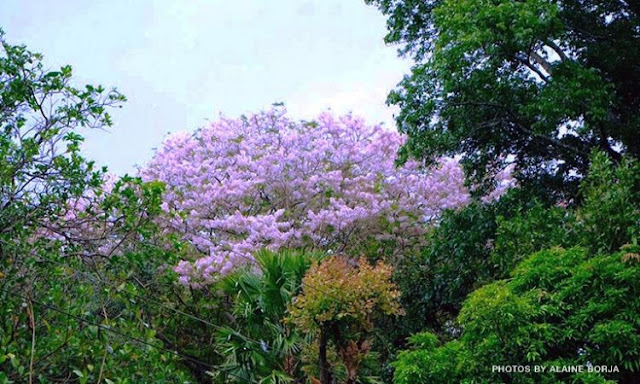
Do you see that pinkish and white colored leaves that looks like a bush? Those are the top leaves of the cherry blossom trees with Mt. Kanlaon as the backdrop!


La Castellana is a first class municipality in Negros Occidental named after Spain’s “Paseo de La Castellana" in Madrid. The town is located at the base of Kanlaon Volcano and is famous for its annual festival, Bailes de Luces, and for its scenic spots.

Loading...

Did you know that you can also find cherry blossom trees in this town? It was just recently noticed by the townsfolk that Palawan cherry blossom trees are growing in the mountain areas of the town which is part of the Kanlaon National Park and Forest Reserve.

It is said that the cherry blossoms color changes depending on the month or season. You’ll either see it in white, yellow or pink.


The mayor of La Castellana, Negros Occidental has already requested the Department of Environment and Natural Resources (DENR) to study the trees and how to propagate it.


There is no word yet if the area will be open to the public for those who would like to see it up close. But, you can already see the trees from the highway if you drive from La Castellana going to Canlaon City.


So when you’re in Visayas, you no longer need to go to Atok, Benguet or Puerto Princesa, Palawan, and even book a flight to Japan or Korea just to see these Sakura trees.


ATTRACTIONS TO SEE IN MANILA 

Klook.com

For more info, contact the La Castellana Tourism Office at (34) 473-0472.

LOOK: Cherry Blossoms Found in Negros Town


Baguio City is dubbed as the "Summer Capital of the Philippines". Since it is situated over 5000 feet above sea level, it's cool climate brings many tourists in the country and attracts many people to visit the entire year.


So last 1 April 2012, me and my girlfriend decided to go for a short vacation in Baguio. The "City of Pines" is one of the hot spots you should experience in the Philippines.

Loading...

WHAT TO BRING FOR BAGUIO

Here are some things you might consider bringing with you for your day tour / adventure:

Shopee is my go-to app for things I needed like the ones above. If you'd like discounts and vouchers, you may get the best offers here:

To-do's and To-visits in Baguio for 3 Days

Here are the activities you can do and the places you can visit in Baguio:


Activities at Burnham Park

Burnham Park is an urban park located at the heart of Baguio City. It was named after the American architect and urban planner, Daniel Hudson Burnham who laid the plans for the city.


The park features a man-made lake situated at the center where tourists can enjoy boating with rented boats. At the southern part of the park, a skating rink was constructed.

The Melvin Jones Grand Stand and Football Field at the eastern part of the park are normally used for several activities like parades, concerts, and political rallies. The Children's Park and the Orchidarium is located at the western part of the park.


There are also bike rentals if one so wishes. You can rent either single bikes, tandem bikes or even bikes with side cars. They even have small bikes for the little kids of both two and three wheel versions. A bust of Daniel Burnham was erected in the northern section where a rose garden is also located.


It was our first choice to start our day upon arrival. Because of its location, we can roam around the city proper.


Visit Baguio Cathedral

The Our Lady of Atonement Cathedral is the famous Roman Catholic cathedral located at Cathedral Loop adjacent to Session Road in Baguio City, the Philippines, and is the see of the Roman Catholic Diocese of Baguio.


Dedicated to the Blessed Virgin Mary under the title of Our Lady of Atonement, its distinctive pink exterior, twin spires and stained glass windows make it a popular tourist attraction in Baguio. Since the church is in the city proper, we allotted time to drop by and see.


Photo-ops at Wright Park

Wright Park is located at the eastern part of the city and fronting the main gate of the Mansion, is one of the many scenic parks in Baguio City.

Its main park features are a shallow elongated rectangular body of water known as the "Pool of Pines" and the park circle which is on one end of the park. Postcard-type photographs are usually taken at both ends of Wright Park and when going there it is best to bring along a camera.


Tall pine trees and decorative street lights line both sides of the access road beside the pool. There are times that you will find at the park some Igorots dressed in their native attire and regalia who are willing to pose for a photograph ... of course, for a fee.

Native handicrafts are also sold at the Mansion end of the park by a few Igorot peddlers. From the park circle is a walkway which leads to a wide stairway made of stones that descend to an area where ponies are rented out.

Wright Park was our first destination in our 2nd day. There are a lot of picturesque here. Also, it is our way to The Mansion then straight ahead to Camp John Hay.


ATTRACTIONS TO SEE IN MANILA 

Klook.com

Go to The Mansion

The Mansion House was built in 1908 to serve as the official summer residence of U.S. Governor-Generals at the instance of Governor-General William Cameron Forbes.

The name is derived from the summer cottage in New England of Governor Forbes whose administration the original Mansion House was built under.


Architect William E. Parsons, based on preliminary plans by architect Daniel H. Burnham, the planner of the city of Baguio, designed the mountain retreat following the tenets of the City Beautiful Movement. In 1910, the meeting of the Second Philippine Legislature was held at the Mansion House for three weeks.

This place is maintained and monitored by security. The guards only allowed us to stay and view the house or the palace inside beyond that beautiful big gate.


Explore Historical Core

One of my favorite spots in the Historical Core is the Bell House and Amphitheater.

I have entered first the old wooden house and noticed its elegance despite of time. The house is bright in white paint and its fancy furniture inside.


The veranda is a perfect place in viewing the pine trees surrounding the place. Then, straight down ahead, you will see the amphitheater, beautifully dressed by flowers.


ACTIVITIES AND TOURS IN MANILA


Strawberry picking at Strawberry Farm, La Trinidad

Located just 30 minutes from Baguio City, Strawberry Farm "opens it doors" for the activity from November to May every year.


Strawberry Farm in La Trinidad Valley, Benguet, less than 10km from the center of Baguio City. View our new searchable map to find its location.


Overlooking at Bell Church

The Bell Church is located north of the downtown area of Baguio along the road leading to the town of La Trinidad, Benguet.

Within its compound are intricately designed arches and buildings adorned with flags, bells and dragons.


It has a pagoda, and beautifully landscapped gardens. There are some artifacts about Buddhism that you will find at the Bell Church as well as some literature about the history of China.

In 2011, I already visited to some of Baguio's landmarks like the following:

Walk around Baguio Botanical Garden

The Baguio Botanical Garden is located east of Baguio's downtown area. You will find it between Teacher's Camp and the Pacdal Circle.

Me at the Botanical Garden in 2011

Its main entrance is along Leonard Wood Road and just across the street from Gilberto's Hotel and Baguio Vacation Hotel. It is quite a large park and about the same size as Burnham Park.


See the rest of Cordilleras at Mines View Park

From the observation deck of the park a breathtaking panoramic view of Benguet's gold and copper mines and the surrounding mountains unfolds before you.

Me at the Mines View Park in 2011

It is a spectacular sight to behold and should not be missed when visiting Baguio.

baguio itinerary for 3days and 2nights baguio itinerary 7 days baguio itinerary 2022 baguio itinerary for family baguio itinerary 5 days 4 nights baguio itinerary 2 days 1 night baguio itinerary 4d3n 4 days 3 nights baguio itinerary
Save this pin for later!

For complete list of Baguio Tourist Spots, we have written a separate blog for 20+ Baguio Tourist Spots and Attractions to Visit + Best Activities to Do.


Baguio-La Trinidad 3D/2N Itinerary

Here's a detailed itinerary you can follow for your upcoming Baguio weekend trip:

Baguio Day 1

  • 2:00 AM – ETD Victory Cubao
  • 7:00 AM – ETA
  • 7:00-9:00 AM – Checked in/Breakfast/Prep for Day 1 Adventure
  • 9:00-9:20 AM – ETD/ETA to Good Shepherd
  • 9:20-9:40 AM – Tour around Good Shepherd
  • 9:40-10:20 AM – Mines View Park Tour
  • 10:20-10:30 AM – ETD/ETA from Mines view park to The Mansion
  • 10:30-10:45 AM – Photo Ops at The Mansion
  • 10:45-11:30 AM – Tour and Photo Ops around Wright Park
  • 11:30- 1:00 PM – Lunch at Ketchup Community (Canto)
  • 1:00-1:15 PM – ETD/ETA at Arca’s Yard
  • 1:15-2:30 PM – Photo Ops at Arca’s Yard
  • 2:30-2:45 PM – ETD/ETA at Botanical Garden
  • 2:45-4:15 PM – Tour and Photo Ops at the Garden
  • 3:15-3:30 PM – ETD/ETA at Burnham Park and Rose Garden
  • 3:30-6:30 PM – Biking/Boating
  • 6:30-8:00 PM – Dinner at Goodtaste
  • 8:00-8:30 PM – ETD/ETA at Camp Johnhay
  • 8:30-10:00 PM – Christmas Village and Camp Johnhay at Night
  • 10:00 onwards – Lights Off


Baguio Day 2

  • 8:00 AM – Wake up
  • 8:00-9:00 AM – Breakfast/Prepare for Day 2 Adventure
  • 9:00-9:30 AM – ETD/ETA Tam-awan Village
  • 9:30-12:30 AM – Photo Ops/Trek
  • 12:30-12:50 AM – ETD/ETA Bencab Museum
  • 12:50-3:00 PM – Photo Ops/Tour around the Museum
  • 3:00-3:30 PM – ETD/ETA Baguio Town Proper
  • 3:30-4:30 PM – Late Lunch
  • 4:30-9:00 PM – Back to Home to rest
  • 9:00-12:00 PM – Baguio Night Market and Night Life
  • 12:00MN onwards – Lights off


Baguio Day 3

  • 8:00 AM – Wake up
  • 8:00-9:00 AM – Breakfast/Prepare for Day 3 Adventure
  • 9:00-10:00 AM – ETD/ETA Strawberry Field
  • 10:00-11:00 AM – Photo Ops/Strawberry Picking/Lettuce Picking
  • 11:00-11:30 AM – ETD/ETA STOBOSA Mural Art
  • 11:30-12:00 NN – Photo Ops at STOBOSA Mural Art
  • 12:00-12:15 PM – ETD/ETA Bell Church
  • 12:15-1:00PM – Photo Ops at Bell Church
  • 1:00-2:30 PM – Lunch at Jack’s Restaurant
  • 2:30-3:00 PM – ETD/ETA at Old Diplomat Hotel
  • 3:00-4:30 PM – Photo Ops
  • 4:30-6:30 PM – ETD/ETA at Lourdes Grotto
  • 6:30-7:30 PM – Enjoy the solemnity of the place
  • 7:30-8:00 PM – ETD/ETA Baguio City Town Proper
  • 8:00-10:00 PM – Dinner/Pack up things
  • 10:00-4:00 AM – ETD/ETA at Cubao via Victory Bus

Victory Liner bus to Baguio

Bus Schedule to Baguio

I published a detailed list of ways in commuting and traveling to Baguio from Manila and from different parts of Luzon via land.

But if you are bringing in your own vehicle, you can follow these fastest routes to Baguio.


Where to Stay in Baguio

Here are some of the many top hotels with Certificate of Authority to Operate (CAO) from the Department of Tourism in Baguio:

baguio accredited hotels 2022 baguio accredited airbnb visita baguio.gov.ph login amber transient house baguio baguio accredited hotels 2021 luningning apartment baguio 456 hotel baguio dot accredited hotels in boracay

For a list of Baguio hotels that have certificate of authorization to operate, check out this post: LIST OF DOT-ACCREDITED HOTELS IN BAGUIO!


Frequently Asked Questions (FAQs) About Baguio


What Baguio is known for?

Baguio, to many, is best known as the "Summer Capital of the Philippines", with its cool climate making this a spot to escape the chaotic scenes in Manila. The city is also home to tropical pine forests, lending the city the nickname "City of Pines".

Is it OK to go to Baguio now?

Who can visit Baguio? For leisure travel or tourism purposes, only the following visitors are allowed to enter Baguio City: All travelers from Areas under ALERT LEVEL 1 and 2. Requirements differ for vaccinated and unvaccinated travelers

Is Baguio a good place to live?

It is generally safe to do so. While at it, it pays to know that Baguio City was declared one of the safest cities in Southeast Asia in 2018. The already-low crime rates had a 41.8% decrease in 2018 compared with that of 2017. Not just in Baguio, but the entire Cordillera region.

What is the beauty of Baguio?

One of those places is the beautiful fog-laden city up the mountains, Baguio! With beautiful mountain scenery and pine trees, the view might look like something out of a dream, with wisps of fog, and colorful flowers and strawberries, Baguio is a perfect romantic destination.

What makes Baguio alluring to tourists?

The combination of chilly weather and age-old buildings in Baguio makes it the top tourist destination of fans of the supernatural. The province, therefore, isn't just a yuletide wonderland, but also a Halloween haven.

Why Baguio is the best tourist spot?

Baguio has always been one of the top destinations in the Philippines. Because of its chilly temperature, pine-dominated landscapes, and overall romantic atmosphere, this mountain city has attracted tourists especially in summer and the holidays like Christmas and New Year.

Is Baguio clean?

The City of Pines has won the Association of SouthEast Asian Nations (ASEAN) Clean Tourist City Award for 2020-2022 after gaining enough points and complying with the requirements of the Asean Clean Tourist City Standard (ACTCS) early this year.

Do you need aircon in Baguio?

Stick with your electric fans if an air conditioner isn't available. For those who are in Baguio City, electric fans are already more than enough to keep things cool since the City of Pines is still cooler than some parts of the country even during summer.


IMPORTANT NOTE: The rates, contact details and other information indicated in this post are accurate from the time of writing but may change without IMFWJ's notice. Should you know the updated information, please message us on Facebook.

WHERE TO STAY IN BAGUIO:

BAGUIO 3D2N ITINERARY (Where to Go, What to Do, Where to Stay)

history of bangui windmills bangui windmills trivia bangui windmills tagalog bangui windmills activities bangui windmills description bangui windmills essay bangui windmills tourism bangui windmills location

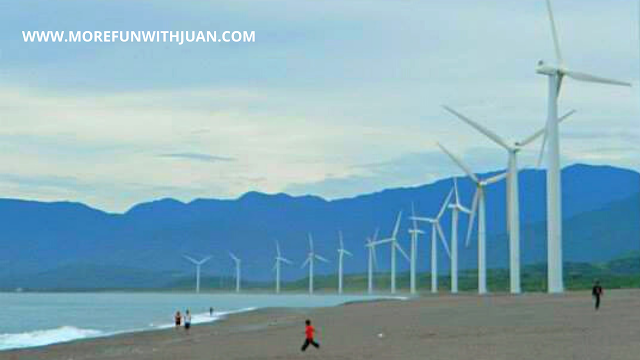
The first ever wind turbines in the Philippines is found here in Bangui, Ilocos Norte!


Bangui Wind Farm is a wind farm in Bangui, Ilocos Norte, Philippines. The wind farm uses 20 units of 70-metre (230 ft) high Vestas V82 1.65 MW wind turbines, arranged on a single row stretching along a nine-kilometer shoreline off Bangui Bay, facing the West Philippine Sea.

history of bangui windmills bangui windmills trivia bangui windmills purpose bangui windmills tagalog how to go to bangui windmills bangui windmills description bangui windmills destinations bangui windmills essay
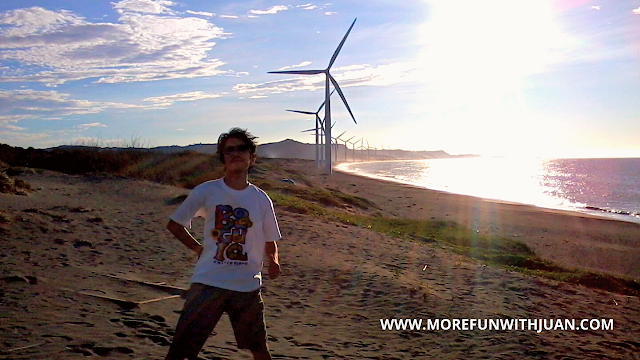
My first time at Bangui Windmill in 2012

Loading...

WHAT TO BRING FOR ILOCOS NORTE

Here are some things you might consider bringing with you for your day tour / adventure:

Shopee is my go-to app for things I needed like the ones above. If you'd like discounts and vouchers, you may get the best offers here:

Phase I of the NorthWind power project in Bangui Bay consists of 15 wind turbines, each capable of producing electricity up to a maximum capacity of 1.65 MW, for a total of 24.75 MW.

Bangui Windmills 2012

The 15 on-shore turbines are spaced 326 metres (1,070 ft) apart, each 70 metres (230 ft) high, with 41 metres (135 ft) long blades, with a rotor diameter of 82 metres (269 ft) and a wind swept area of 5,281 square metres (56,840 sq ft).


Phase II, was completed on August 2008, and added 5 more wind turbines with the same capacity, and brought the total capacity to 33 MW. All 20 turbines describes a graceful arc reflecting the shoreline of Bangui Bay, facing the West Philippine Sea.


THINGS TO DO AT BANGUI WINDMILL

Here are some of the things you can do inside Bangui Wind Farm:
  • Pictorial (selfie)
  • Beach bum
  • Buy souvenirs


MY PERSONAL EXPERIENCE

I've been here twice and I loved it here. The first time was when I joined my co-worker's team building in 2012.

history of bangui windmills bangui windmills trivia bangui windmills tagalog bangui windmills activities bangui windmills description bangui windmills essay bangui windmills tourism bangui windmills location
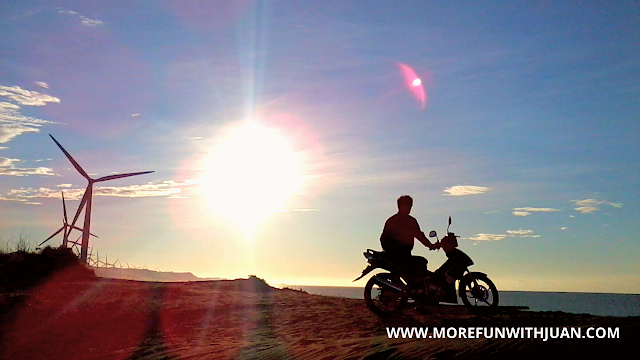
That's my officemate, Sai Dapitan who brought his own motorbike all the way from Manila. Photo taken in 2012

We traversed the rough and narrow road from the north entry where there weren't stores or any stalls. It was very raw and we enjoyed the sunset, a perfect way to end the day.

My first travel with Team Basti 2013

The following year, I visited here again with my new travel buddies (Team Basti). This time, we took the south entry which is much accessible for visitors.


There are a line of stores for food, drinks and souvenirs, too. Here, the view is much better and there's a wide space for different perspective.


Anyway, both entries can be accessed if you are going to bring your own vehicle. There are parking spaces, too.

Bangui Windmill is majestic by itself. Make sure to drop by when you visit Ilocos Norte. :)


ATTRACTIONS TO SEE IN ILOCOS NORTE 

Klook.com

HOW TO GET TO BANGUI WINDMILL

Although Laoag City is the main point of transportation in Ilocos Norte, the Municipality of Banguiis nearer to Pagupud, a tourist hot spot in the province.

LAOAG CITY can be accessed by the following:
  • By Land: Partas, GV Florida Transport, Dominion Bus Lines, Philippine Rabbit and Fariñas Transit have daily trips that will take you directly to Laoag City.
    Travel Time: From Manila to Laoag City, 10-12 hours. So, I advise you to have a night trip for this.

  • By Plane: Take a direct flight from Manila to Laoag via Cebu Pacific or Philippine Airlines.
    Travel Time: From Manila to Laoag City is about an hour. Flights are usually at night, so better make the necessary adjustments on your itinerary.

For complete details, visit - LAOAG TRANSPORTATION GUIDE

For airfare and transportation, you may check PISO FARE promos or you can directly compare air, sea and land travel fare and prices here:

    Bangui is about 1-2 hours drive from Laoag City. The town is also next to one of top destinations in the province, Pagudpud.


    ACTIVITIES AND TOURS IN MANILA

    WHERE TO STAY IN ILOCOS NORTE

    Knowing that Ilocos Norte is one of the top tourist destinations in the country, finding a place to stay here is not really a big challenge but of course, it would be ideal and less hassle to book your reservations as early as possible.

    There are many budget hotels, transient houses and of course those luxury hotels to stay in. You can check our list of accommodation in Ilocos Norte and see which one suits your budget.


    Frequently Asked Questions (FAQs) About Bangui Windmills


    • Where is the biggest windmill in the Philippines?
      The 150 MW Burgos Wind Farm is the largest wind power project not only in the Philippines but in Southeast Asia.

    • What form of energy does the Bangui windmill produce?
      The NorthWind power project in Bangui Bay consisted of 15 of those wind turbines, each with a maximum production capacity of 1.65 MW of electric power, making a total of 24.75 MW.

    • How do you get to the windmills in Bangui?
      If you come from Laoag City, you can take the bus going to Bangui or Pagudpud from the Bangui and Pagudpud bus terminals. Get off at Bangui town proper and from there, you can hire a tricycle, as there are no jeepneys going directlyt to the Bangui windmills.

    • Who is the owner of Burgos wind farm?
      The owner of Burgos wind farm is Energy Development Corporation and operated by Vestas.


    Check out my Ilocos Travel Guide:

    ilocos tour itinerary 2018  diy ilocos tour itinerary 3d2n 2018  diy ilocos tour itinerary 3d2n 2019  3d2n complete itinerary of vigan-laoag-pagudpud tour  ilocos itinerary by car  ilocos tour itinerary 2 days  manila to ilocos norte by car  baguio-vigan-laoag-pagudpud itinerary

    Have fun, Juan!


    WHERE TO GO IN ILOCOS?

    Batac   Burgos   Laoag   Pagudpud   Paoay   Vigan


    IMPORTANT NOTE: The rates, contact details and other information indicated in this post are accurate from the time of writing but may change without IMFWJ's notice. Should you know the updated information, please let us know by leaving a message in the comment box below.

    BANGUI WINDMILLS: The First Wind Farm in the Philippines (Ilocos Norte Tourist Spot)

    how to add facebook comment box in blogger 2018  how to add facebook comments to website  add comments to website  comments plugin  facebook page comments  how to comment a blunt on facebook  facebook post comments  facebook comment box for blogger posts

    Thinking of adding a Facebook comment box plugin on your Blogger but don't know how to?


    Check this helpful tips I found from techubber.blogspot.com
    Loading...


    STEP 1: Create a Facebook App for your blog site


    First of all, you need to create a Facebook App.
    • Go to this link and to create Facebook app: https://developers.facebook.com
    • Hover on the "My Apps" drop-down button near the Facebook Account name (top right corner)
    • Click on "Add a new app"
    • The platform selection window will open. Since we are going to add comment box on a Blogger blog site, click on "Website"


    • In the next page, enter the name of the Facebook App. Preferably keep a name related to your blog site so you can identify easily later on.
    • Choose a category for the app.
    • Click "Create App ID"
    • In the next page, scroll down and under "Tell us about your website", enter the URL of the Blogger blog site. Click Next to proceed.
    • In the next page, scroll down to the bottom, and under "Next Steps", click on "Social Plugin"


    • Facebook Social Plugins page opens. Click on Comments.
    • In the "Comments Plugin" section, click on "Web"
    • We'll get a Comment Configurator and a code will be generate for the comment box.


    Facebook Comments Plugin Code Generator

    The Facebook Comment Plugin Code Generator page looks like this: 


    1. Choose URL or Page

    Enter the URL of the website/blog where you want the comments box to appear.

    2. Code Configurator

    • In the Code Configurator, enter the URL of the website/blog where you want the comments box to appear.
    • Adjust settings like the width of your comments plugin or how many posts you want to show by default.
    • Click the Get Code button to generate your comments plugin code. As we finish entering the URL of the site and/or the size, the Facebook comment will show a live preview of how it will look.

    3. Get Code

    Click on the "Get Code" button. The plugin code and instructions to add it on the website are displayed.

    Note: Keep the page open, we will refer to it again.


    STEP TWO: Integrating Facebook Comment Plugin to Blogger Blog

    1. Login to Blogger and click on your blog for which you just created the Facebook App
    2. Click on "Template"
    3. Before proceeding, backup your current Blogger blog template by clicking on the "Backup/Restore" button on the top-right. Select to download a full template. Save it on your computer.

    Before editing the Blogger template, it is a safe practice to always backup so that we can restore if something goes wrong. It is easier and time saving to revert to the previous configuration instead of troubleshooting and finding the line where the mistake was made.

    4. With backup taken, click on "EDIT HTML". A page opens which contains the Blogger Template's XML code. Be careful when making any changes else it may break. But we have a copy backed up, don't we?

    5. Refer the Facebook Developer page open:
    • Facebook is telling us to "Include the JavaScript SDK on your page once, ideally right after the opening <body> tag."
    • Find the <body> tag: click any where inside the code once and press "CTRL+F" to show the search bar.
    • Enter only "<body" without the ending ">" in the search bar and hit enter. The <body> tag may look like this.

     <body expr:class='&quot;loading&quot; + data:blog.mobileClass'>

    The reason why we did not search with <body> is because there are some code in between <>, and the search will fail otherwise.

    • Go back to the Facebook Developer page which we kept open, and copy the JavaScript SDK code displayed right under "Include the JavaScript SDK on your page once, ideally right after the opening <body> tag." The code looks like this:

    <div id="fb-root"></div>
    <script>(function(d, s, id) {
    var js, fjs = d.getElementsByTagName(s)[0];
    if (d.getElementById(id)) return;
    js = d.createElement(s); js.id = id;
    js.src = "//connect.facebook.net/en_US/sdk.js#xfbml=1&version=v2.5&appId=YOURAPPID";
    fjs.parentNode.insertBefore(js, fjs);
    }(document, 'script', 'facebook-jssdk'));</script> 

    • Go to the Blogger EDIT HTML page and paste the code right after the end of the <body> tag.
    • Click on "Save Template".


    ATTRACTIONS TO SEE IN MANILA 

    Klook.com

    Now you should be getting an XML parse error which says:

     Error parsing XML, line 663, column 64: The reference to entity "version" must end with the ';' delimiter.


    • Edit the code by changing "&"(ampersand) highlighted in red below with "&;" highlighted in green

    Before Edit: the culprit is the ampersand (&) before "version" and "appId" in the line starting with js.src

    <div id="fb-root"></div>
    <script>(function(d, s, id) {
    var js, fjs = d.getElementsByTagName(s)[0];
    if (d.getElementById(id)) return;
    js = d.createElement(s); js.id = id;
    js.src = "//connect.facebook.net/en_US/sdk.js#xfbml=1&version=v2.5&appId=YOURAPPID";
    fjs.parentNode.insertBefore(js, fjs);
    }(document, 'script', 'facebook-jssdk'));</script>

    After Edit: replaced & with it's entity name "&amp;"

    <div id="fb-root"></div>
    <script>(function(d, s, id) {
    var js, fjs = d.getElementsByTagName(s)[0];
    if (d.getElementById(id)) return;
    js = d.createElement(s); js.id = id;
    js.src = &quot;//connect.facebook.net/en_US/sdk.js#xfbml=1&amp;version=v2.5&amp;appId=YOURAPPID";
    fjs.parentNode.insertBefore(js, fjs);
    }(document, 'script', 'facebook-jssdk'));</script> 

    • After editing, Save the Template and the parsing error should not appear again.

    Don't close this page just yet. We have a second code to deal with.


    ACTIVITIES AND TOURS IN MANILA


    Facebook Comment Box Placement in the Blogger Template


    Now we come to the most important part of this process - placement of the Facebook Comment Box in the Blogger Template. Care should be taken where you place the Facebook Comment Box code in the Blogger Template, because if you place it anywhere else, the Facebook Comment Box may not appear at all. In some cases, it may appear on desktops but it may not appear on mobile devices as Blogger has different CSS code for desktop and mobile templates.

    Go back to the Facebook Developer page open. The second code displayed under "Place the code for your plugin wherever you want the plugin to appear on your page.", looks like.

     <div class="fb-comments" data-href="http://techubber.blogspot.com" data-numposts="5"></div> 

    But don't use that code. Because the HREF is the link of the blog and not the link to individual post. So the same Facebook comments will appear on all the posts. (Explained further below).

    Use the following code instead: to display the Facebook Comment Box

    <!-- facebook comment box -->
    <b:if cond='data:blog.pageType == &quot;item&quot;'>
    <h2>Comment with Facebook</h2>
    <div class='fb-comments' data-numposts='5' expr:href='data:post.canonicalUrl' expr:title='data:post.title' expr:xid='data:post.id'/>
    </b:if>
    <!--facebook comment box -->

    In the code above:

    <!-- facebook comment box --> is just a comment line for identification
    <b:if cond='data:blog.pageType == &quot;item&quot;'> checks if the current page type is a blog post item.
    <h2>Comment with Facebook</h2> a description line provided. Delete this line if not required.


    Should you use the above code in Blogger widget/gadget?


    You can paste the above code in Blogger's HTML/JAVASCRIPT widget, drag and drop the widget just below the main posts widget. The comment box will show below the posts. But the problem is that it will show the Facebook Comment Box way below, below the "previous" and "next" link. So it will look ugly. We'd like the Facebook Comment Box somewhere right below the end of the post, not all the way down. So don't place it in widgets.

    The ideal area to place the Facebook Comment Box in Blogger Template:
    Please note that Blogger has separate codes for desktop and mobile devices. So we need to place the Facebook Comment Box Code in two different places.

    1) Facebook Comment Box For Desktop Browsers: 
    • Go to the Blogger > Template > EDIT HTML page
    • Click any where inside the code page and press "CTRL+F" to show the search bar.
    • Enter "post-footer-line post-footer-line-3" and hit enter to search. 
    • Anything inside "post-footer-line post-footer-line-3' is displayed on desktop browsers and not on mobile devices.

    It looks like:

     <div class='post-footer-line post-footer-line-3'>

    Paste the Facebook Comment Box code below right after "<div class='post-footer-line post-footer-line-3'>" 

    <!-- facebook comment box -->
    <b:if cond='data:blog.pageType == &quot;item&quot;'>
    <h2>Comment with Facebook</h2>
    <div class='fb-comments' data-numposts='5' expr:href='data:post.canonicalUrl' expr:title='data:post.title' expr:xid='data:post.id'/>
    </b:if>
    <!--facebook comment box -->

    The "<!-- facebook comment box -->" is a comment line added just for identification.

    Note:
    Under <div class='post-footer-line post-footer-line-3'>, you may see items such as "post-location" and "About Me". If you don't display sections like "About Me" you may ignore or for future usage, you may follow. If you display these items, you may want to display the Facebook Comment Box below these items. Because Facebook Comment Box is going to expand if there are more comments and it won't look good if these sections are displayed after the Facebook Comments.
    Look for sections like <span class='post-location'> and <b:if cond='data:post.authorAboutMe'>

    In that case, you should look for the ending </div> tag of <div class='post-footer-line post-footer-line-3'> and place the Facebook Comment Box code right before </div> 
    • Save the Template
    • View the blog to test.
    • Test it on desktop browser and also on mobile browser. You should be able to confirm that the Facebook Comment Box appears on desktop browser but not on mobile browser.


    The Facebook Comment box should now appear below the post. Viewers who are logged in to Facebook will see his/her profile picture near the comment box. Those who are not logged in with see a default blank profile photo. When he/she clicks on the comment box, the user will see a "Log in to Facebook" button.


    2) Facebook Comment Box For Mobile Device Browsers:

    Now that the Facebook Comment Box is added and display confirmed on desktop browser, let's add the same for mobile device browsers. Surprised? Well, the Facebook Comment Box we just added will not show on mobile device browsers as the place where the code is added is not displayed on mobile browsers. So we need to add specifically for mobile browsers too.
    • Go to the Blogger > Template > EDIT HTML page (if you are not already there)
    • Click any where inside the code page and press "CTRL+F" to show the search bar.
    • This time enter "post-footer-line post-footer-line-1" and hit enter to search.

    There are more than one instances of "post-footer-line post-footer-line-1". We want the first one. Check the line numbers on the left, and note the one that comes first (lowest line number).
    • Within "post-footer-line post-footer-line-1", you will also find that there are other sections - such as:

    <span class='post-author vcard'>some code in between......</span>
    <span class='post-timestamp'>some code in between......</span>
    <span class='post-comment-link'>some code in between.....</span>

    • Place the following Facebook Comment Box code right above <span class='post-comment-link'>. So it should look like this:

    </span>
    <!-- facebook comment box -->
    <b:if cond='data:blog.pageType == &quot;item&quot;'>
    <h2>Comment with Facebook</h2>
    <div class='fb-comments' data-numposts='5' expr:href='data:post.canonicalUrl' expr:title='data:post.title' expr:xid='data:post.id'/>
    </b:if>
    <!--facebook comment box -->
    <span class='post-comment-link'> 

    • Save the Template
    • View a blog post on mobile device and see if the Facebook comment appears.

    Now that you have added Facebook Comment Box for both desktop and mobile, Facebook comment should appear on both desktop browsers as well as mobile device browsers. Just check that two Facebook Comment boxes are not appearing on any device. If that is the case, the Facebook Comment code might have been some error in placing the Facebook Comment Box code. Check this post again for the right placement. 


    What to Read Next

    How to Add Facebook Comments Box on Your Blogger Blog Site?